


:quality(80))


:quality(80))


:quality(80))


:quality(80))


:quality(80))
:quality(80))
Read summarized version with
 ChatGPT
  Perplexity
  Gemini
  Claude
  Grok
Grok Key takeaways
OTA commissions reach up to around 20% per booking, so shifting reservations to the direct channel protects margin. The website is the one place a hotel controls the full experience.
The core onsite channels for hotels are popups, sticky bars, embeds, an onsite notification feed, and web push. Each fits a different moment in the guest journey.
Targeting matters more than format. Trigger campaigns by referral source, visit count, pages viewed, and scroll depth so first-time browsers, returning guests, and OTA-referred visitors each see a relevant message.
Direct-booking campaigns convert best when they name a concrete perk such as free breakfast, a lower rate, free parking, or flexible cancellation, rather than a vague discount.
Behavioral triggers do the heavy lifting: an exit popup recovers a guest leaving a room page, web push brings them back hours later, and a contextual offer turns browsers into leads.
Hotels lose a share of revenue to booking platforms charging up to around 20% per reservation, while the average hotel website converts only one to two percent of visitors. The website is the one channel a hotel fully controls.
The starting point is the guest, not the campaign. A first-time browser, a returning guest, and a comparison shopper each need a different message. Below are the campaigns that fit each one, and how to set them up to turn more traffic into direct bookings.
See who is browsing your properties, and which guests are ready to book
We review your traffic and show which campaigns can reach more visitors and which targeting options would help you drive more direct bookings.
:quality(80))
Start with your guest segments
A solo traveler, a family comparing large units, a returning guest checking dates, a spa-curious guest who already booked, and someone who arrived from Booking.com to price-check your rate can all be on the site at once. Each needs a different message.
The campaigns in this article map to the segments below. The aim is the right message for the right intent, rather than one offer shown to everyone.
Match campaigns to your segments
Each campaign below is built around a specific moment in the guest journey, triggered by real behavior rather than time on page alone. The sections that follow explain the value of each one and how to set it up in Wisepops.
| Campaign | Trigger | Format | Best for | |
|---|---|---|---|---|
| 01 | Recommendation quiz | About 50% scroll, or exit on an overview | Quiz | Undecided travelers |
| 02 | Room exit recovery | Exit intent after 20s on a room page | Popup | All room-page guests |
| 03 | Direct-booking perks | On a homepage or landing page | Popup | First-time browsers |
| 04 | Contextual offer | Timed, mid-session | Popup | Browsers not ready to book |
| 05 | Returning guest welcome | Session count of two or more | Returning guests | |
| 06 | Web push recovery | 2 to 4 hours after exit | Push | All guests |
| 07 | Scroll-depth booking embed | 70% scroll on a room page | Engaged browsers | |
| 08 | Multi-property shortcut | 3+ property pages in a session | Popup | Group and family planners |
| 09 | Notification feed | Always on, behind a bell icon | Onsite feed | Every guest |
| 10 | Loyalty program | While a guest selects a room | Loyalty-minded guests | |
| 11 | Restaurant and menus | Contextual, on dining pages | Popup | Dining guests |
| 12 | Live webcams | On click, via a tab | Video campaign | Scenic properties |
| 13 | Off-peak packages | Seasonal targeting | Popup | Low-season dates |
| 14 | Signature experiences | Contextual placement | Feed, embed, or bar | Experience-seekers |
| 15 | Email signup | Timed or on scroll | Signup form | First-time browsers |
Help undecided travelers choose with a quiz
Choosing a hotel is hard, which is why travelers visit dozens of sites before deciding. A quiz engages hesitating visitors and gives them personalized recommendations.
Pick the pages where interest is highest, such as the homepage or the hotel selection page. A visitor who scrolls through hotels, checks one or two, then returns to browse more is still looking, and that is the moment to offer the quiz.
For undecided visitors, a branching campaign asks one question, the type of stay they are planning, then shows a matching property and a direct booking link. It can perform up to 4 times better than a standard exit message, because the answer maps to real intent.
Recover guests leaving a room page
When a guest has spent time on a room page and then moves to close the tab, an exit popup can hold them with a reason to book direct. Trigger it on exit intent after about 20 seconds on a room page, so it only reaches guests who showed real interest.
Pass the room name and property to Wisepops as custom properties, and the message names the exact room the guest viewed. The button links straight to that room's booking page rather than the homepage, so there is no second search.
List your direct-booking perks with a homepage campaign
A homepage campaign puts your direct-booking advantages in front of first-time visitors. Made contextual and personalized, onsite campaigns convert an average of 4.65% of visitors.
They are well suited to direct bookings because they put time-sensitive promotions and your differentiators in front of the right audience. If guests cannot quickly see why booking direct is better, a lower rate, free breakfast, a loyalty perk, or a unique experience, the strategy is missing a piece.
The Columbia Hotel tells new visitors that direct bookings come with free breakfast, drinks, parking, and fast Wi-Fi. The template uses two buttons: one to the booking page, one to the details, so guests can review the conditions first.
)
Hotel Meyer runs a similar homepage campaign listing four booking benefits, including a lower rate, free parking, and flexible rescheduling, with a Check Availability button to start selecting dates.
)
Turn browsers into leads with a contextual offer
A contextual offer pairs a small, concrete incentive with a low-commitment ask, fired at the moment a guest is engaged. It turns browsers who are not ready to book into leads you can follow up with.
A promo code can unlock a complimentary menu upgrade for any guest who requests a non-binding quote. The code gives a reason to act now, and the quote request captures the contact before the guest leaves.
Pick up where returning guests left off
A returning guest weighing dates does not need the same signup message as a first-time visitor. Wisepops treats session count as a built-in condition, so a second or third visit can trigger a warm bar instead.
The bar picks up where the guest left off, linking to the last property they viewed, while the generic signup message is suppressed for them. Session memory makes this automatic across visits.
Bring guests back after they leave
Web push is the one channel that reaches a guest after they have left the site. A browser notification can re-engage someone who viewed a room and closed the tab without booking.
Ask for the opt-in as a guest benefit, for example availability alerts, after about 45 seconds on a room page. The recovery notification fires a few hours later and links back to the room the guest was viewing.
Surface a booking summary as guests read
A guest who scrolls most of the way down a room page has read the details and is evaluating, not bouncing. An inline embed near the foot of the page brings the room summary and a booking button back into view without a scroll back up.
An embed sits in the page rather than over it, so it catches interest without interrupting. Trigger it at about 70% scroll on room pages, and fill it with the room details passed as custom properties.
Help guests comparing several properties
Group and family planners often open several property pages in one session, comparing before they commit. Once a visitor has viewed three or more property pages, a campaign can offer help rather than another room card.
The message points to a quick recommendation or a direct line to your team to talk through dates and room types. It suits hotels whose advantage is local knowledge and service, since it offers a conversation rather than a discount.
Run an always-on notification feed for offers and events
Onsite notifications are a social media-style feed of marketing messages built for websites. They sit behind a bell icon and let guests open updates when they want them, with no interruption.
Visitors who interact with the feed convert 3.5 times more and view 2.5 times more pages than those who do not. For a hotel keeping a fresh, current feel, the feed is a place to show social content, events, exclusive offers, and community news.
Attitude Hotels and Resorts, a hotel network in Mauritius, runs exactly this. Visit the site and you see unread messages waiting in the bell.
)
Open the feed and you find what is happening across the network, plus a link to book directly at the best price. Examples of campaigns hotels share this way: exclusive direct-booking discounts, seasonal offers, early-bird promotions, holiday packages, subscriber-only deals, and partner collaborations.
Raise awareness of your loyalty program
A loyalty program draws guests who value ongoing benefits. Embeds, sections you add directly to a page, can surface it at the moment a guest is most likely to book.
Embeds catch interest without interrupting it. On a room page, an inline booking summary that appears once a guest scrolls most of the way down keeps the room details and a Check Availability button in front of them, exactly when they have read enough to decide.
At ESPACIO The Jewel of Waikiki, while a visitor is selecting a room, a contrasting message highlights the perks of joining the Leaders Club. That is a well-timed nudge to book.
Learn more
)
Small Luxury Hotels of the World takes a related approach, surfacing the INVITED members rate, 10% off plus benefits, to logged-out visitors with a bottom-of-screen message that encourages login or signup without breaking the browsing flow.
You can also show small, non-intrusive promotional messages at checkout. Alohilani Resort Waikiki Beach displays a side tab that reminds guests of rewards unlocked after booking. To improve it, I would move the message to the lower right so it does not cover important information, and target it to the checkout URL only.
)
Promote your restaurant and menus
Highlighting dining is a strong move for guests who treat food as part of the trip. A campaign can showcase signature dishes, a new menu, or an exclusive dining event, and link straight to a reservation.
Stream your live webcams in a video campaign
Live webcams give guests a real-time look at your views, weather, or onsite events. For beachfront resorts and scenic properties, they spark interest and support bookings.
A sticky bar with a short message and a button is one way to send people to the webcam. A more engaging option is a video campaign with a tab: a launch button sits in the lower corner, and clicking it opens the campaign and starts the stream.
Learn more
)
Fill off-peak dates with package offers
Bookings often dip in off-peak periods. Onsite campaigns can promote packages designed to fill those slower weeks.
Casa Andina Hotels, a Peruvian chain, promoted its latest offers in this campaign, with two buttons leading to two different hotels.
)
Spotlight signature onsite experiences
Unique experiences attract niche audiences and add revenue beyond room bookings. Many hotels list them in the main menu, but they often need more visibility to get noticed.
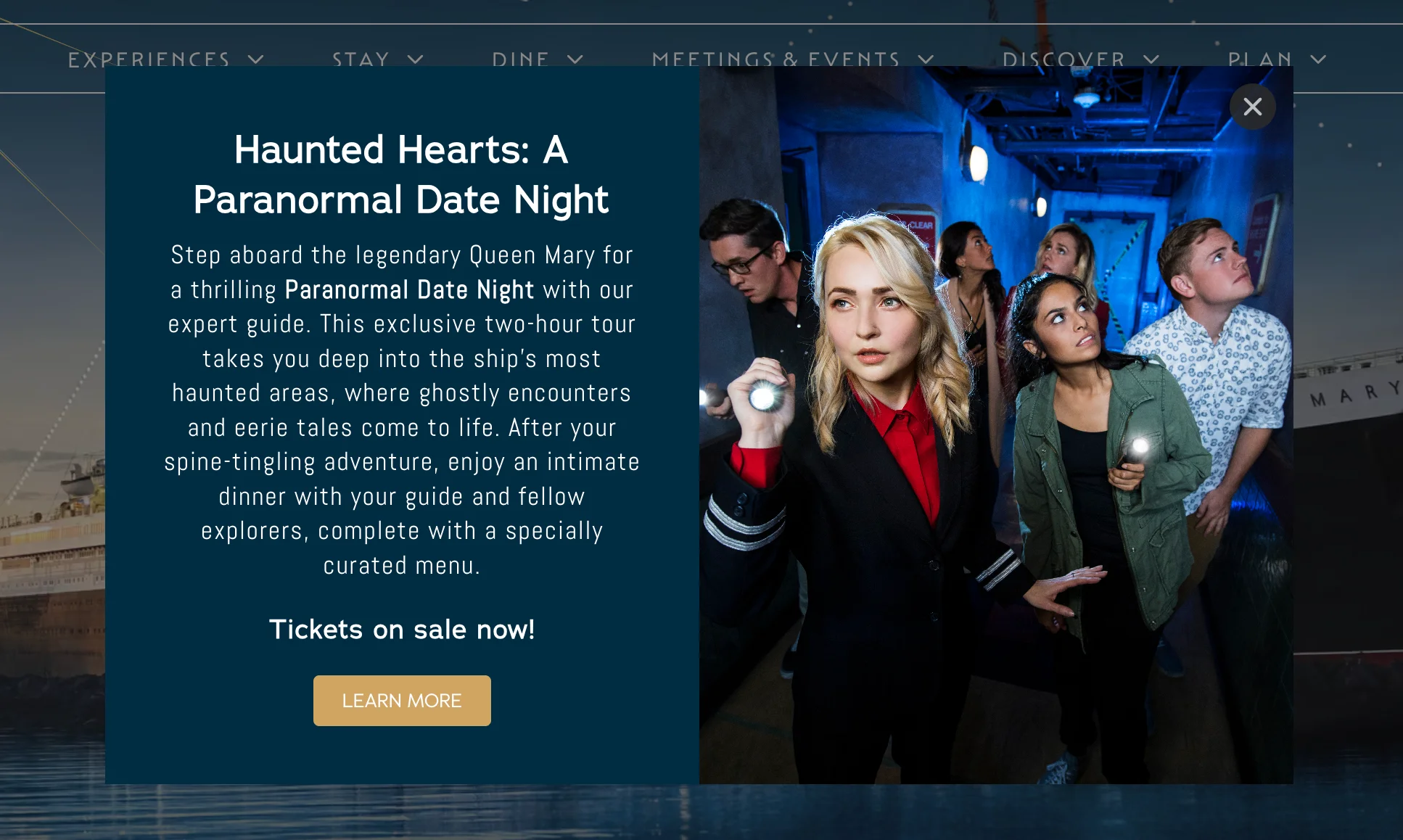
The Queen Mary Hotel spotlights its paranormal date nights, tapping into its history and reputation for hauntings to draw thrill-seekers and history fans.
Grow your email list with a signup incentive
First-time visitors hunting for the best offer are hard to engage. The right incentive can capture an email and bring them back when you have a special offer to share.
Good Hotel Guide, a UK accommodation guide, promises special offers and monthly travel tips through a Wisepops campaign.
)
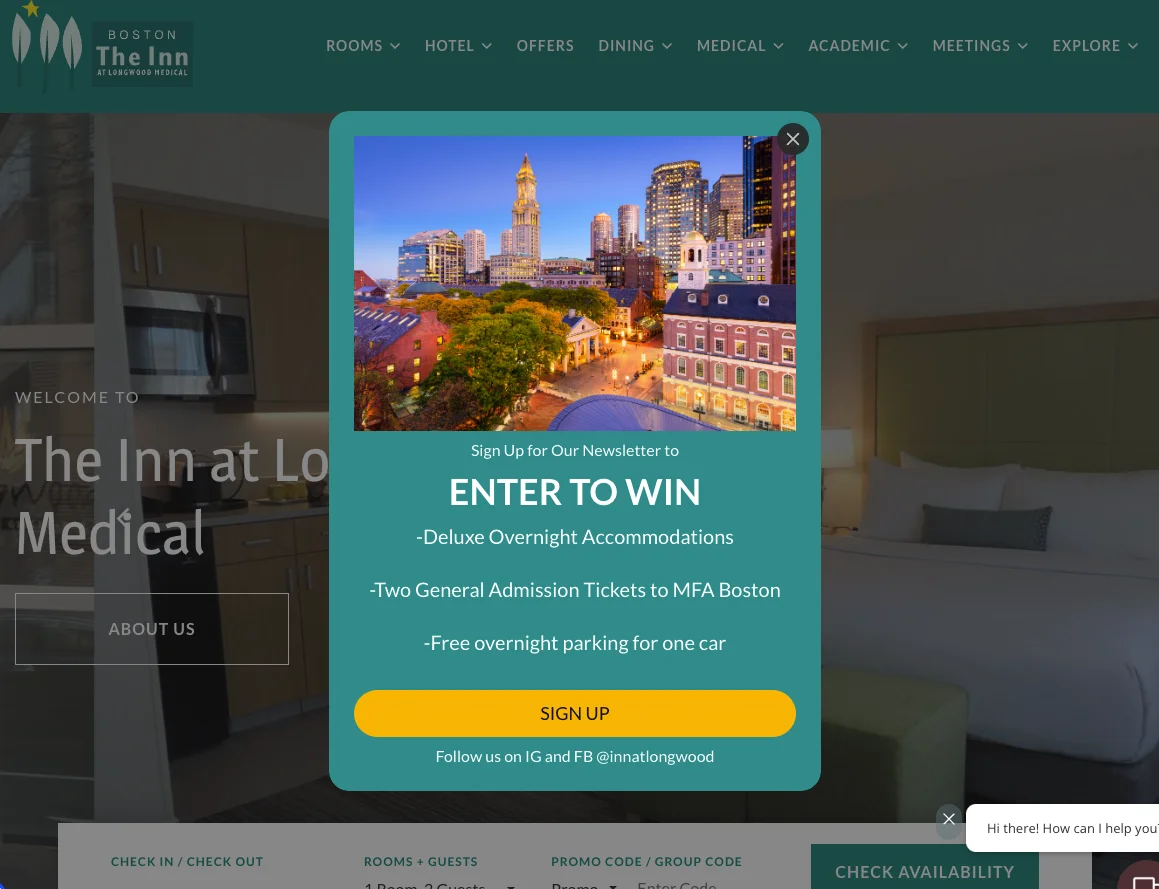
The Inn at Longwood Medical in Boston goes further, offering entry to win two tickets to the Museum of Fine Arts, an overnight stay, and free parking.
Getting started
Every Wisepops engagement starts with a free behavioral audit of your site. One line of code activates the tracker, and after about 7 days you get a clear picture of who is on your site, where guests drop off, and which campaigns to run first.
From there you can build campaigns from real data rather than generic templates, run them across one or many properties, and track revenue attributed to each one.
One detail matters once several campaigns are live: they should never fire at once. Priority and suppression rules sequence them, so a guest sees one relevant message for where they are in the journey rather than two competing for attention.
Want to see this for your hotel?
Book a personalized demo and we will walk you through how Wisepops can engage your visitors, drive direct bookings, and capture leads with targeted campaigns.
Frequently asked questions
Does Wisepops work with our booking engine?
Wisepops installs with one JavaScript tag on the main website, not inside the booking engine. Campaigns fire before guests reach the booking page and link straight to the right booking URL, even when the engine sits on a separate domain like Mews or WebRez.
We already use another onsite campaign tool. Why switch to Wisepops?
The difference is targeting. Wisepops fires campaigns from real signals like referral source, session count, and pages viewed, so a comparison shopper and a returning guest each see a relevant message rather than the same generic one.
What does the free site audit include?
Wisepops installs a lightweight tag, then after about 7 days delivers a briefing on who is on your site, where bookings drop off, and 4 to 6 campaigns to run first. The audit is free and the tracker keeps running afterward.
How does Wisepops attribute revenue to a campaign?
Revenue is attributed when a guest books after interacting with a campaign, not just after viewing one. A/B testing with control groups measures the real lift each campaign produces against a baseline.
Can Wisepops manage campaigns across multiple hotel properties?
Yes. One account manages multiple websites, up to one million page views a month across all properties at no extra cost. Campaigns can be duplicated across properties or targeted to specific URLs.
Get started
in minutes
Start converting more visitors today.
Get started in minutes and see results right after.