


:quality(80))


:quality(80))


:quality(80))


:quality(80))


How to Personalize Your Ecommerce Site Without Code
:quality(80))
:quality(80))
Read summarized version with
 ChatGPT
  Perplexity
  Gemini
  Claude
  Grok
Grok Key takeaways
Onsite personalization runs on targeting rules: conditions you set once that determine which message each segment sees automatically, without any manual work per session
Four channel types cover different moments in the visitor journey; for example, popups for high-intent offers, embeds for inline context, bars for session-wide messaging, and the onsite feed for all visitors
Dynamic product recommendations, geo-targeting, UTM matching, and past browsing history are among the targeting conditions that make campaigns feel relevant rather than generic
A/B testing with control groups is the only reliable way to measure whether your personalization is generating incremental revenue — or whether those visitors would have converted anyway
All of this is configurable from a visual editor without writing a single line of code
Your site reaches 100% of your visitors. Your emails reach the fraction who open them. Many teams personalize their email flows obsessively, which often results in serving every website visitor a very similar experience.
This guide covers how to close that gap using no-code onsite channels.
Get started:
See what's possible on your site
Get a personalized audit of your site within 7 days — visitor segments ready to convert, campaigns to run first, estimated revenue impact.

:quality(80))
What is onsite no-code website personalization?
No-code website personalization means showing different messages to different visitor segments based on who they are, where they came from, and what they've done. The mechanism is targeting rules: conditions you set once that determine which message each visitor sees, automatically.
Research found that timing, segment, and format all move outcomes but also that what works for one store doesn't transfer directly to another. Targeting rules determine who sees which message. A/B testing determines which version of that message actually works.
For personalization types, benefits, and broader strategy, the website personalization guide covers those.
No-code channels to personalize your website's marketing messaging
1. Popups
Targeting conditions worth building around:
New vs. returning visitors — welcome offers go to people who've never converted; returning non-subscribers can see a stronger incentive
Exit intent — trigger when someone moves toward closing the tab
Time on page or pages visited — wait until a visitor has shown real intent
URL rules — different messages on product pages, category pages, and the homepage
UTM parameters — match your popup to the campaign that brought someone in
Geolocation — country-specific shipping offers, language-matched copy, regional promotions
Language — serve the right language based on browser settings without building separate pages
Past pages visited — target visitors who browsed a specific category in a previous session
Example — Nutrimuscle:
Nutrimuscle needed to convert new customers unfamiliar with supplements without changing the experience for experienced returning buyers.
For new visitors, they ran a 3-step popup: email collection first, then sport type and training frequency, then a promo code applied directly to the cart with tailored product recommendations.
:quality(80))
:quality(80))
:quality(80))
Experienced customers, identified by account page visits, saw a best seller recommendation popup instead of the welcome popup offer:
:quality(80))
The page-level data shows why this personalization matters:
campaigns on account pages hit 10.2% CTR,
collection pages 15.4%, and
product pages 6.8% for whey-specific campaigns
Each a different audience at a different moment, reached with a different message.
Example — L'Atelier d'Amaya:
L'Atelier d'Amaya ran three personalized campaigns for three segments. New visitors saw a gamified giveaway popup offering free jewelry for an email.
Visitors already browsing product pages saw a discount popup triggered by URL — the same popup on the homepage would have reached people not yet in a buying mindset.
:quality(80))
Registered customers received a birthday popup via Shopify integration, inviting them to add a birthdate for a future personalized offer.
:quality(80))
:quality(80))
2. Embedded forms
Embeds sit inside your page content and add context without interrupting the session. Where they work well:
Below the product description — promo code, size guide, or dynamic product recommendations based on browsing history
Cart page — relevant upsell before checkout
Category pages — inline promotion or featured collection
Thank-you pages — related products for someone who just converted
Example — L'Atelier d'Amaya:
The brand placed an embed directly below the "Add to Cart" button on product pages — a discount reminder at the moment a visitor is actively considering a purchase:
:quality(80))
On relevant product pages, a separate embed informed visitors about in-store piercing and engraving services:
:quality(80))
Example — émoi émoi:
To promote their Superga collab (buy two pairs of shoes, get a free pair of socks), émoi émoi embedded a campaign directly on eligible product pages. The embed highlighted the offer, let visitors apply the promo code with one click, and guided them to pick the second pair — no screenshot needed, no Customer Care tickets.
:quality(80))
They also used embeds for upsell campaigns on product pages. Visitors who interacted saw a 23% higher average order value compared to those who didn't.
:quality(80))
3. Website bars
Bars stay visible across the session without blocking content.
Best for:
Shipping thresholds
Limited-time sale announcements
New arrivals or restocks
Location-specific messaging that applies session-wide
Example — L'Atelier d'Amaya:
Throughout their promotional periods, L'Atelier d'Amaya ran a sticky bar at the top of the site communicating free delivery and engraving services — sitewide, always visible, impossible to miss without a popup interruption.
:quality(80))
When the Black Friday sale was ending, they switched to a contrasting black bar to signal urgency. Same format, different message, timed to the moment:
:quality(80))
4. The onsite feed
The feed is a bell icon that sits in the website header — visible on every page, accessible at any time, without interrupting the browsing session. Think of it as a social media feed adapted for ecommerce: it's there for every visitor, but the notifications inside change by segment.
The same targeting rules that apply to popups apply to individual notifications inside the feed:
Logged-in VIP customers see exclusive deals
Visitors who browsed a specific category see new arrivals in that category
Dynamic product recommendations appear only for visitors who've viewed related items
A free shipping threshold notification shows only when someone has items in their cart
Example — Nutrimuscle:
Nutrimuscle built two feed campaigns around different personalization logic.
The first was a cart threshold notification. When a visitor adds a product, a notification shows exactly how much more they need for free shipping. The message updates as the cart value changes:
:quality(80))
The second surfaced their protein and collagen comparison tools as feed notifications — shown only to visitors who hadn't yet visited those pages, excluded from anyone who had via past URL targeting.
The protein comparator alone drove €278K in revenue at 7.1% CTR:
:quality(80))
Example — émoi émoi:
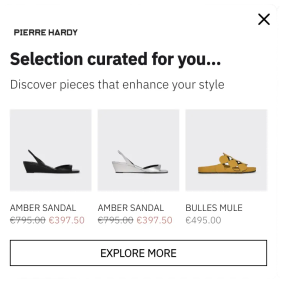
émoi émoi used the feed to serve AI product recommendations to each visitor based on recently viewed items. Visitors who clicked on those recommendations had an 11.4% order rate.
:quality(80))
No-code website personalization strategy
Step 1: Map your visitor segments before building anything
Step 2: Match each segment to the right channel
Step 3: Build always-on campaigns first
Step 4: A/B test to find what works for your audience
Step 1: Map your visitor segments before building anything
The most common mistake is building campaigns channel by channel without a plan — a welcome popup here, a bar there — with no logic connecting them. Before creating anything, map out who your visitors are and what they need at each moment.
The segments worth starting with:
First-time visitors with no purchase history
Returning visitors who haven't converted yet
Visitors currently browsing a specific category
Visitors with items in their cart
Existing customers (logged in or identifiable via Shopify)
For each segment, ask: what's the most useful thing you could show them right now? That answer determines the channel and the message — not the other way around.
Step 2: Match each segment to the right channel
Each segment has a different context, and each channel handles a different type of interaction:
First-time visitors → popup, for a one-time high-visibility offer they haven't seen before
Visitors browsing a category or product page → embed, for inline context that adds relevance without interrupting
All visitors, session-wide → bar, for persistent information like shipping thresholds that applies regardless of where they are on the site
Returning visitors → onsite feed, for ongoing updates they can access on their own terms
Existing customers → targeted popup or feed notification, personalized via Shopify data or Klaviyo segments
Assigning each segment to one primary channel avoids the same visitor seeing multiple campaigns competing for attention.
Step 3: Build always-on campaigns first
Always-on campaigns run continuously against a fixed segment — new visitor welcome, cart abandonment popup, returning visitor reminder — and don't require ongoing maintenance once set up and tested.
Seasonal and promotional campaigns come on top. Emma Sleep's structure is a good model: always-on landing discount popup and exit-intent popup run year-round, then seasonal creative and offers layer on top during peak periods without replacing the foundation.
Step 4: A/B test to find what works for your audience
Targeting rules determine who sees which message. A/B testing determines which version of that message works — and whether the campaign is generating incremental revenue or whether those visitors would have converted anyway.
Two test types worth running:
Variant testing — two versions of a campaign for the same segment: different copy, offer, format, or trigger timing.
Control group testing — the segment is split: half see the campaign, half see nothing. This is the only way to measure true incremental impact rather than attributed clicks that may overlap with email or paid channels.
For step-by-step setup including control groups, see how to A/B test popups.
Frequently asked questions
What is no-code ecommerce personalization?
Showing different messages to different visitor segments — based on behavior, location, or traffic source — without writing code. You configure targeting rules once in a visual editor, and the platform handles the rest automatically.
What's the difference between popups, embeds, and bars for no-code website personalization?
Popups are high-visibility overlays for one-time offers to specific segments. Embeds sit inside the page and add context without interrupting. Bars stay visible across the session for persistent messaging like shipping thresholds or sale announcements.
What targeting rules can you use to personalize ecommerce campaigns without code?
New vs. returning visitor, pages visited in current or past sessions, exit intent, cart value, UTM parameters, geolocation, browser language, device type, and custom properties from Shopify or Klaviyo.
Can you run ecommerce personalization across multiple markets without a developer?
Yes. Geo-targeting and language rules handle localized offers, copy, and shipping thresholds per market — all configurable from a visual editor, no dev work per country.
Get started
in minutes
Within 7 days of installing our tracker, we’ll deliver a personalized audit with identified opportunities and their estimated revenue impact. No commitment.