


:quality(80))


:quality(80))


:quality(80))


:quality(80))


Behavioral Segmentation: What It Is, Types & Examples
:quality(80))
:quality(80))
Read summarized version with
 ChatGPT
  Perplexity
  Gemini
  Claude
  Grok
Grok Key takeaways
Behavioral segmentation groups website visitors by what they do on your site, so each group gets a message matched to its intent rather than one generic campaign.
The more specific the segment, the better it converts. A generic campaign shown to everyone normally underperforms.
Standard signals like exit intent and scroll depth are the starting point, not the ceiling. A traffic audit can reveal very specific and unique segments in your store.
It works without knowing who your visitors are. Around 90% of ecommerce traffic is anonymous, and behavioral segmentation handles it.
AI takes it further by predicting what a visitor is about to do, not just reacting to what they already did.
Behavioral segmentation is how you stop treating every shopper the same way. Instead of grouping people by who they are, you group them by what they do.
The data backs it up. Our popup statistics study shows popups targeting new visitors convert at 8.30%, versus 4.60% for untargeted campaigns.
Go further with custom properties, personalizing by criteria like purchase history, loyalty tier, or cart value, and conversion jumps from 3.8% to 9.98%.
In this guide:
See your segments
Match each visitor to the right campaign
We review your traffic, show the behavioral segments hiding in it, and map the campaigns that fit each one, with the revenue they could reach.
:quality(80))
What is behavioral segmentation for ecommerce?
Behavioral segmentation is the practice of dividing website visitors into groups based on what they actually do, rather than who they are. Instead of static traits like age or location, it reads the actions people take as they browse: which pages they view, how far they scroll, how often they return, what sits in their cart, where they click, and what they have bought.
Because those signals update in real time and come from your own site, each segment reflects current intent rather than a fixed profile, which is what makes it worth acting on with tailored messages, offers, or onsite experiences.
Benefits of behavioral segmentation
The right message at the right moment converts. The same message shown to everyone often gets ignored.
Done correctly, segmentation delivers the following benefits:
Your customers get what they actually need: a returning buyer sees content matched to where they are in their journey, not a welcome offer they already claimed or information they do not need.
Every channel performs: targeting the right audience on the right channel consistently outperforms broadcasting the same campaign to everyone.
You make the most of your existing traffic: behavioral segmentation multiplies what you already have without spending more on acquisition.
You reach more of your visitors: around 90% of ecommerce visitors never identify themselves. Behavioral segmentation reads session-level signals in real time, so even anonymous visitors get campaigns matched to what they are doing.
Go deeper on targeting
See every targeting rule and how to combine them in the popup targeting guide.
Types of behavioral segmentation
There are six ways to group visitors by behavior. The first five run on rules you define; the last one uses AI to find patterns you did not go looking for.
Website behavior
Pages visited, time on page, scroll depth, and clicks on CTAs. How visitors move through your site reveals where they are in the decision process.
Someone who spent four minutes on a product page, scrolled to the reviews, and left is not the same as someone who bounced after ten seconds. Same exit, completely different intent.
Category browsers
Product page dwellers
Comparison shoppers
Visitors who reach checkout but do not complete
Purchase behavior
How often, how much, and under what conditions a customer buys.
A customer who only converts during a sale is a different segment from one who buys at full price every six weeks.
Each group has a different relationship with price, timing, and incentives.
Frequent buyers
First-time purchasers
Deal-seekers who wait for discounts
High-value customers with above-average order sizes
Customer lifecycle stage
Where someone is in the customer lifecycle changes what they need to hear.
A first-time visitor needs a reason to trust you and an incentive to act, like a welcome discount.
A customer who bought once three months ago and has not returned needs a different conversation than a loyal repeat buyer on their tenth order.
New visitors
First-time buyers
Active customers
Lapsed customers
Churned customers
Interest and engagement
Blog posts read, categories browsed, and time spent on specific product types.
A visitor who reads three articles about skincare routines and browses serums is showing intent before they ever add anything to cart.
That signal is actionable even without a purchase history, and it is exactly what product recommendations are built on.
Category-specific browsers
Content readers
Wishlist users
Visitors who engage with recommendations
Customer satisfaction
Repeat purchases, reviews left, referrals made, or complete silence after an order.
How customers feel about their experience shows up in their behavior before they tell you directly.
Grouping by satisfaction lets you act before a good customer becomes a lapsed one.
Promoters who refer others
Satisfied but passive buyers
At-risk customers showing signs of disengagement
AI-driven
Session depth, browsing patterns, cart activity, engagement timing, and similar-visitor behavior.
AI reads multiple signals at once and builds segments in real time, without predefined rules.
Where the five types above require you to define the rules first, AI finds patterns you did not go looking for.
That includes visitors who behave like buyers but have not converted, and anonymous shoppers whose sessions resemble high-value customers.
It also catches visitors showing early abandonment signals before they reach the exit.
High-intent anonymous visitors
Predicted cart abandoners
Visitors likely to convert on a second session
Put a segment to work
Many of these segments convert best with a campaign that reacts to what a visitor is doing right now. See the behavioral popups guide for setups you can copy.
Behavioral segmentation examples and results
Nutrimuscle: educate new customers without disrupting returning ones
Type of segmentation: customer status (new vs. returning)
Nutrimuscle, a sports nutrition brand, wanted to convert first-time buyers who knew little about supplements while leaving the experience intact for returning customers.
Account-page campaigns aimed at existing customers reached 10.2% CTR, their strongest engagement from that group.
Nutrimuscle's supplements are hard to choose between if you are new to them, so first-time visitors got help making a decision.
A three-step welcome popup collected an email, then a phone number plus sport type and training frequency, then a discount code with matched product recommendations.
:quality(80))
Returning customers, who already knew the range, kept seeing the site as before, but this time they also got offers of best sellers:
:quality(80))
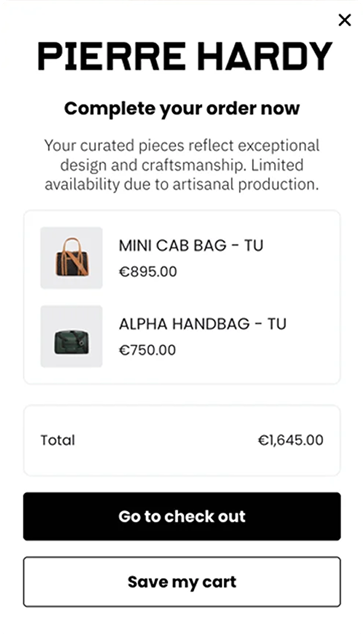
Pierre Hardy: serve paid and organic traffic differently
Type of segmentation: traffic source (paid vs. organic)
Pierre Hardy, a luxury footwear and accessories house, needed to convert paid traffic without discounts or anything that would compromise the brand for everyone else.
The onsite strategy, built on audience segmentation, influenced 22% of total online revenue, without a single discount campaign.
Paid visitors got an exclusive interactive experience built for ad-referred sessions:
:quality(80))
Organic visitors saw a minimal, editorial welcome instead:
:quality(80))
Tikamoon: different offers for subscribers and non-subscribers
Type of segmentation: subscriber status
Tikamoon, a furniture and home decor retailer, wanted to grow its email list without showing sign-up offers to people who had already subscribed.
Splitting subscribers from non-subscribers meant each group saw something relevant.
Tikamoon collected 139,857 emails, and campaigns aimed at already-subscribed visitors kept converting, delivering 7.87% CTR, nearly double the rate of broader campaigns.
Non-subscribers received a €20 discount offer tied to sign-up. Subscribers got sale countdowns and early access offers instead. Key pages like VIP landing pages and thank-you pages were excluded from all campaigns.
:quality(80))
L'Atelier d'Amaya: keep registered customers engaged
Type of segmentation: registered customers
L'Atelier d'Amaya is a jewelry brand focused on bringing registered customers back for repeat purchases.
Onsite campaigns attributed 24% of total revenue over six months, with a 200x ROI.
A birthday campaign invited them to share their birthdate, so the brand could send a personalized treat on the day:
:quality(80))
A Double Loyalty Points campaign rewarded existing customers during key sales periods, generating €14,991 on its own:
:quality(80))
Sud Express: reach shoppers at the right moment, at their own pace
Type of segmentation: browsing behavior and product interest
Sud Express is a premium fashion brand, so aggressive tactics and blanket discounts were never an option. The goal was to convert visitors without cheapening the experience.
Rather than greeting everyone with the same popup the second they landed, or running a campaign on a timer, we segmented visitors by what they had actually browsed.
Recently viewed items and cross-collection suggestions appeared based on how people were actually shopping.
Campaigns reached 32.4% of total visitors. Sud Express attributed 6 to 7% of revenue to onsite campaigns in three months.
:quality(80))
How to implement personalized behavioral segmentation?
Five steps to put it in place:
Collect the right behavioral data. Start with page views, scroll depth, clicks, cart activity, and time on page. These are available on any ecommerce store and form the foundation of every segment.
Look for patterns specific to your store. The same traffic hides different segments in every store. Look at what your visitors actually do and where behavior diverges, rather than starting with assumptions.
Define segments around meaningful differences. A segment is only worth building if it needs a different response. If a group would benefit from a different message, timing, or offer, it is a segment. If not, it is just a filter.
Use AI to find what you would miss manually. AI reads combinations of signals across sessions and spots patterns rules would never catch. Wisepops maps these segments in its free traffic audit.
Match each segment to a distinct experience. Use popups for high-intent moments, embedded forms for passive capture, and the onsite feed for ongoing engagement.
Standard segments vs personalized segments
The difference between a segment you assume and a segment your data reveals shows up across every dimension:
Dimension
Standard behavioral segments
Personalized behavioral segments
How they are defined
You set the rule before looking at the data
The data shows you what to look for
What they are based on
One signal: visited page, device, or traffic source
A combination of signals that form a profile
What they reveal
Where a visitor is in a funnel you already assumed
A funnel or group you did not know existed
Uniqueness
Similar for every store
Specific to your catalog and your traffic
What they tell you
When to show a campaign
Whether to show one at all, and what it should say
Example
New visitor, cart abandoner, mobile user
Visitors who browse across categories, buyers who need a quote before they commit, customers who bought once and never came back
FAQ
How is behavioral segmentation different from psychographic segmentation?
Psychographic segmentation groups people by attitudes, beliefs, and lifestyle, usually learned from surveys or inferred from media consumption.
Behavioral segmentation groups people by what they actually do on your site, and that data is available in real time without asking anything.
Does behavioral segmentation work for anonymous visitors?
Yes. Most behavioral signals, including scroll depth, time on page, pages viewed, and cart state, do not require visitor identification.
You can segment and target anonymous visitors using session-level behavior alone.
What data does behavioral segmentation require?
At minimum: page URL data, session timestamps, and scroll events.
For richer segmentation including cart state, purchase history, and customer tags, a Shopify or CRM integration is needed.
Wisepops connects natively to Shopify and reads that data directly.
Is behavioral segmentation marketing compliant with GDPR?
Behavioral segmentation based on in-session signals uses first-party data collected on your own domain, which generally falls under legitimate interest or implied consent under GDPR.
It does not rely on third-party cookies or cross-site tracking. Collecting and storing personal data still requires explicit consent, but behavioral targeting and data collection are separate activities.
Does behavioral marketing work for B2B?
Yes. Behavioral signals help B2B marketers separate casual visitors from potential buyers.
This makes it easier to score leads, personalize follow-up, and focus sales efforts on prospects showing genuine purchase intent.
Get started
in minutes
Start converting more visitors today.
Get started in minutes and see results right after.