


:quality(80))


:quality(80))


:quality(80))


:quality(80))


:quality(80))
:quality(80))
Read summarized version with
 ChatGPT
  Perplexity
  Gemini
  Claude
  Grok
Grok Key takeaways
A behavioral popup fires based on what a visitor does (page visited, element clicked, cart state, exit movement), not a timer. The trigger is the signal; audience conditions narrow who receives it.
Click-triggered popups average 28.79% CVR, the highest of any trigger type, because the visitor has already expressed intent through a specific action.
URL-targeted popups convert 152% more visitors than untargeted campaigns. The page a visitor is on is one of the clearest intent signals available.
Shopify stores can target popups using native cart and customer data, including
cart.total_price,customer.orders_count, andproduct.tags, without custom development.Exit intent works on mobile too, though differently from desktop — cursor movement doesn't apply. Mobile exit intent uses different signals. AI-powered cart recovery complements it by predicting abandonment from multiple behavioral signals.
The most effective behavioral popups combine a trigger with an audience condition. Exit intent scoped only to sessions with items in cart outperforms exit intent shown to everyone.
Most popup campaigns fire on a timer: a visitor lands, five seconds pass, a popup appears, regardless of what that visitor has done. That's broadcasting, not behavioral targeting.
URL-targeted popups convert 152% more visitors than untargeted campaigns, and campaigns using behavioral properties improve conversions by up to 163%, according to Wisepops data from over one billion popup displays. This guide covers how behavioral popups work, which trigger types perform best, and how to layer audience conditions for precision.
In this article:
Get a free traffic audit
We analyze your traffic to identify the customer segments visiting your site, then propose specific campaigns to convert each one. No commitment, completely free.
:quality(80))
What is a behavioral popup?
A behavioral popup appears in response to a specific visitor action or signal (such as clicking an element, browsing a product page, adding items to a cart, or moving toward the browser exit) rather than firing on a fixed timer. Because the trigger reflects what the visitor is doing, behavioral popups deliver more contextually relevant messages and convert at significantly higher rates than time-based alternatives.
:quality(80))
Case study
Exit intent + AI recommendations: 22% revenue influence in 12 months
Pierre Hardy triggers exit-intent popups for high-value cart visitors, showing AI-powered product recommendations at the moment they're about to leave.
Read the case study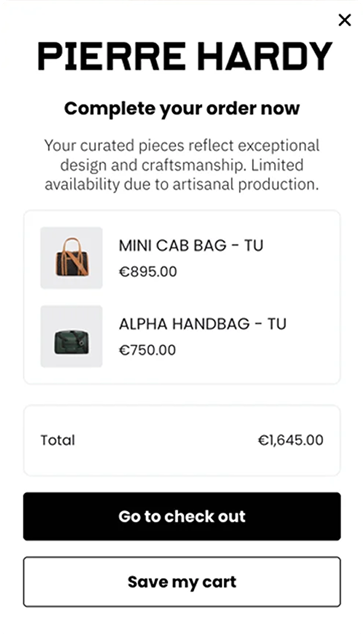
How behavioral popups work
Every popup has two components that determine when and to whom it appears: a trigger and an audience condition. Most teams configure the trigger and leave the audience on the default (everyone). That's where behavioral targeting breaks down.
The trigger defines the event that fires the popup: a click, a scroll depth, an exit signal, a custom event from your store. The audience condition narrows the pool of visitors who qualify: new vs. returning, traffic source, pages visited, cart state, customer history.
A behavioral popup uses at least one of these two components, ideally both, to match the message to the moment. A trigger without audience scoping still broadcasts to everyone who qualifies.
How behavioral popups work

Behavioral trigger types
These are the main trigger types, ranked roughly by how directly they reflect visitor intent.
On click
The popup fires when a visitor clicks a specific element: a button, a link, an image, or a tab. Because the visitor has already taken a deliberate action, on-click campaigns average 28.79% CVR overall, and 25.24% among the top 10%.
This is the highest average CVR of any trigger type. The visitor's click signals intent; the popup responds to a declared action rather than inferring one from timing or position.
Exit intent
The popup fires when the visitor's cursor moves toward the top of the browser window, signaling they're about to leave. The top 10% of exit-intent campaigns convert 19.26% of visitors.
Performance scales significantly with audience scoping. Exit intent shown to every visitor is a weak behavioral signal. Exit intent scoped to visitors with items in cart, or above a cart value threshold, is a strong one.
Mobile: Exit intent works on mobile too, using different signals than cursor movement. Read more about mobile exit intent. AI-powered cart recovery, covered below, handles mobile sessions independently.
Scroll depth
The popup fires after a visitor scrolls through a defined percentage of the page. Scroll triggers confirm reading intent: a visitor at 70% of a long-form page is more engaged than one who just landed.
Average CVR is 2.18%, with top performers reaching 16.67%. The gap reflects how much audience scoping and content relevance matter. Scroll triggers work best on content-heavy pages: buying guides, comparison pages, editorial blog posts.
Custom event
The popup fires when a specific event is tracked from your store: adding to cart, completing a step in a funnel, reaching a cart value threshold, or viewing a product in a specific category. Custom event triggers have the highest ceiling of any type; the top 10% convert 48.70% of visitors, according to Wisepops popup data.
That ceiling exists because the event is a precise behavioral signal: a specific action the visitor took, not a proxy for one. Custom event triggers require JavaScript or GTM configuration.
See what's achievable without developer involvement in the no-code personalization guide.
Audience conditions
A trigger defines when a popup fires. An audience condition defines for whom. Without conditions, even a well-chosen trigger broadcasts to everyone who qualifies, usually too broad to be precise.
The main behavioral audience conditions available without any integration:
URL targeting: the page visited signals where the visitor is in the buying journey. Pricing page visitors are further down the funnel than blog readers; showing them the same popup ignores that difference.
New vs. returning: returning visitors have already seen your catalog. Showing them the same welcome offer as a first-time visitor is a contextual mismatch.
Traffic source: UTM parameters let you create audience rules based on campaign, source, or medium. Visitors from paid ads have responded to a specific message and often have shorter decision windows than organic visitors.
Page history: number of pages visited in a session as a proxy for engagement depth. A visitor on their fifth page is more invested than one who just landed.
Device type: mobile visitors behave differently from desktop visitors. Certain offers and formats convert better depending on device context.
For a full breakdown of how to configure and combine these conditions, see the targeting strategies guide. For collecting behavioral data directly from visitors, quiz popups let you segment by their own answers before any purchase signal exists.
Shopify-native behavioral properties
Shopify stores have access to a set of built-in properties that can be used as audience conditions, covering the current session and the visitor's purchase history.
Product properties
Cart properties
Customer properties (logged-in visitors only, except customer.is_logged_in)
These properties shift targeting from session behavior to store history. A popup scoped to visitors where customer.orders_count is above 3 won't show to first-time buyers. A win-back offer conditioned on customer.last_order.created_at only reaches customers who actually haven't purchased in a defined period.
Campaigns using behavioral properties convert up to 163% more visitors than unscoped campaigns.
Practical use cases and full setup are covered in the Shopify popup personalization guide.
AI-powered cart recovery: beyond rule-based triggers
Exit intent has a structural ceiling. It detects cursor movement toward the browser chrome, a reasonable proxy for abandonment intent on desktop. On mobile, cursor movement doesn't exist, so mobile exit intent uses different signals.
Wisepops' AI cart recovery trigger evaluates multiple behavioral signals (browsing patterns, session depth, time on key pages, device context) to predict when a visitor with items in their cart is likely to abandon. It works across devices. The model trains continuously on cross-store traffic, improving over time.
The popup fires for sessions where the model predicts abandonment, renders actual cart contents, and pairs them with a time-limited offer specific to what that visitor is about to leave behind, not a generic prompt. It works across devices, including mobile sessions where cursor-based exit intent doesn't apply. For the full mechanics, see the cart abandonment guide.
Behavioral popup examples
Each example below combines a specific trigger with an audience condition. The combination, not the trigger alone, is what produces the result.
Ziggy Family: on-click for educational content
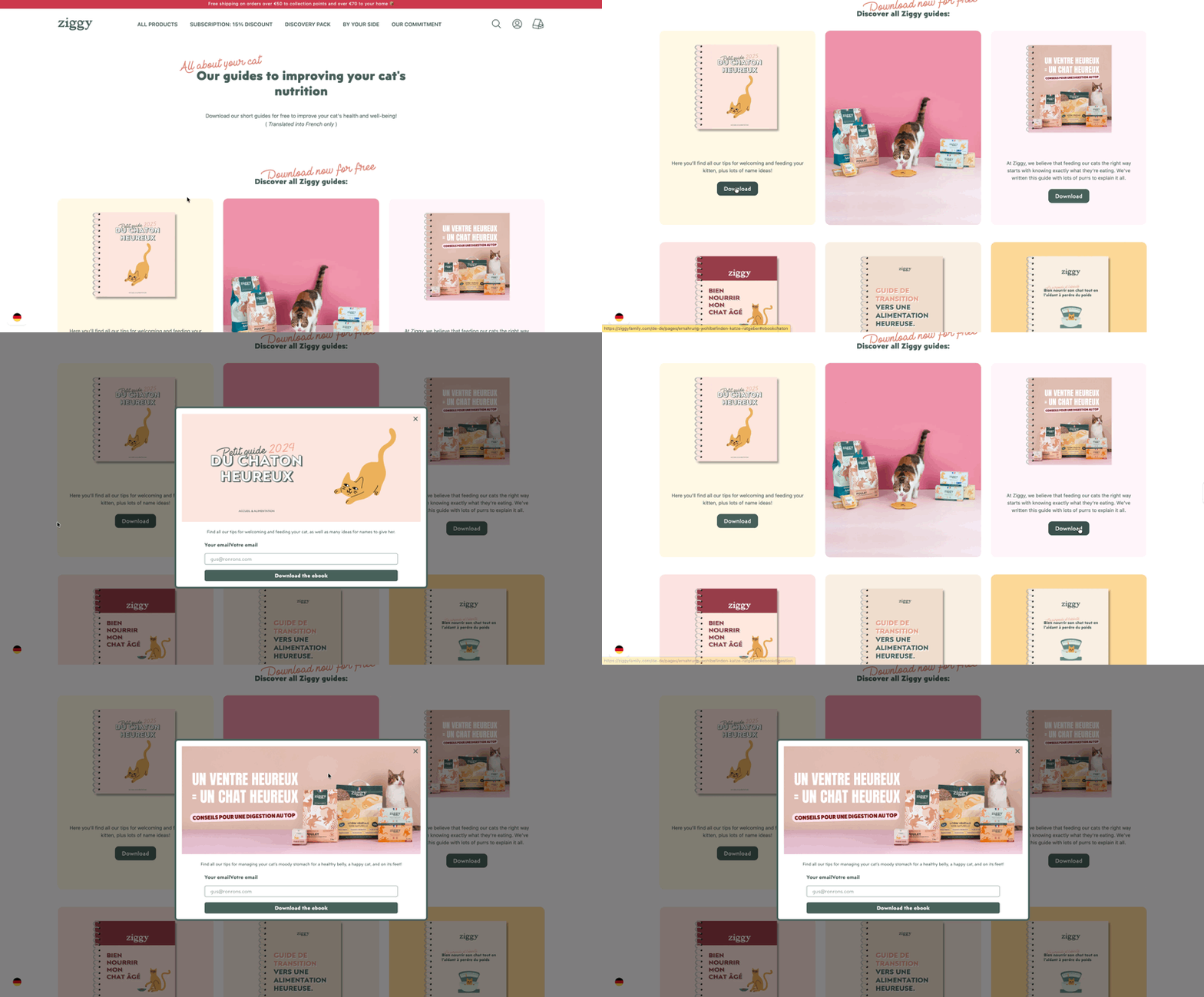
Ziggy Family placed on-click popups on blog and product pages, each offering a downloadable ebook on a specific cat nutrition topic. The trigger fires when a visitor clicks the download CTA; the popup delivers a signup form at exactly the moment the visitor has declared their interest.
Result: 74.9% CTR on ebook campaigns, contributing to 9,300 qualified email subscribers in five months. Full details in the Ziggy Family case study.
carVertical: page URL as purchase-intent signal
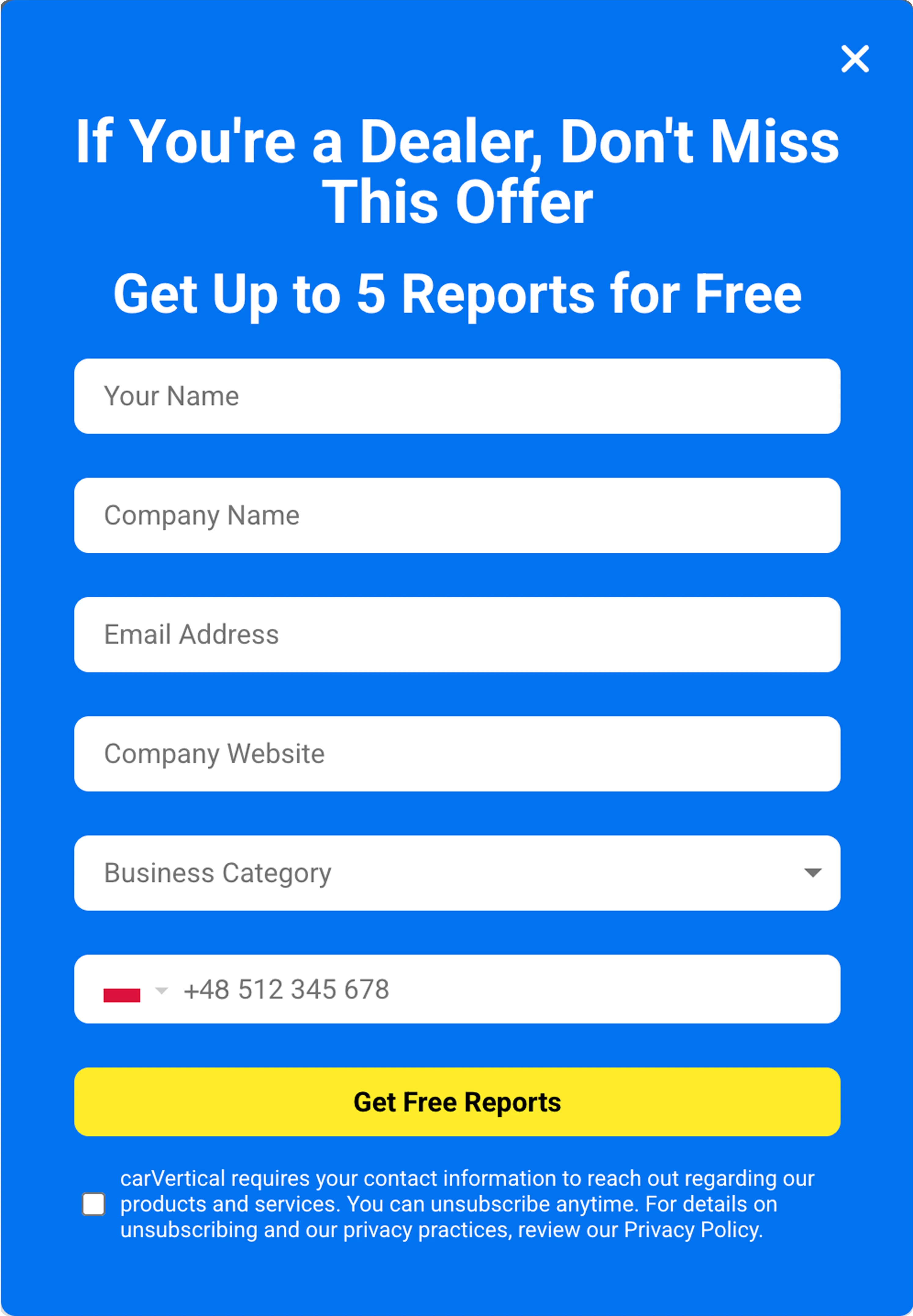
carVertical runs different popup campaigns by funnel stage. Visitors on pricing and precheck pages see an offer calibrated to that decision moment. Visitors on landing pages see a different version suited to earlier awareness.
Pricing and precheck pages deliver 18.9–27.8% CTR. Over 12 months: 574,000 email subscribers at a 6.5% signup rate across 10+ European markets. Full breakdown in the carVertical case study. The dealer-segment popup below adds a geographic condition on top of URL targeting; the phone flag is set automatically from the visitor's country.
L'Atelier d'Amaya: product-browsing popup
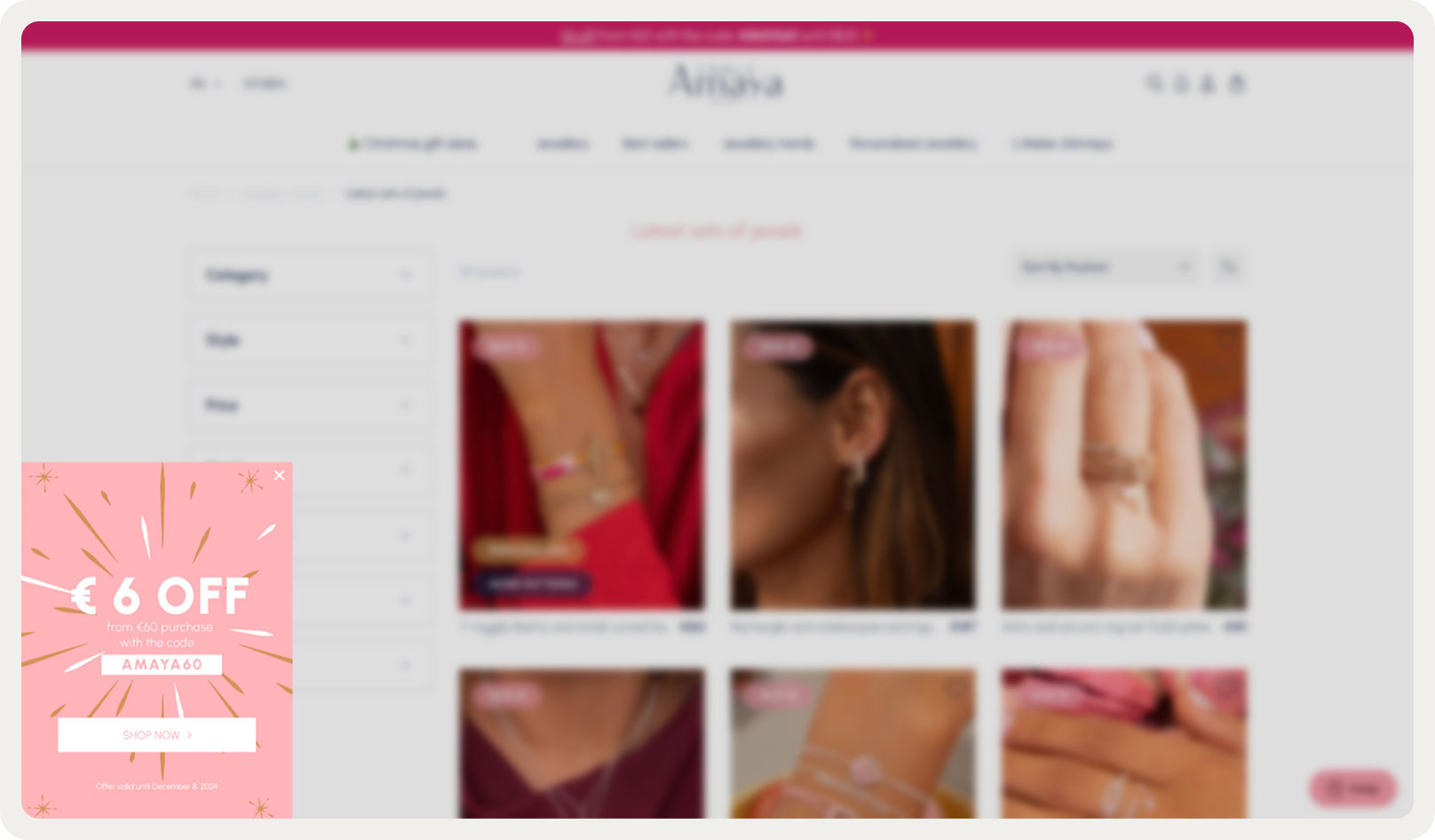
L'Atelier d'Amaya scopes a discount popup exclusively to visitors on product pages: people already evaluating a purchase, not reading about the brand for the first time. The audience condition does the filtering work; the popup just has to be relevant.
This campaign contributed to €971,000 in attributed revenue and 95.8% site visitor reach over six months. Full story in the L'Atelier d'Amaya case study.
MakerFlo: URL targeting on a specific page
MakerFlo placed a popup on their bundle-builder page only. Visitors navigating to that URL have already chosen to explore the bundle mechanic, pre-qualified before the popup appears. Result: 22.9% CTR, with 14.7% of clicks converting to orders.
:quality(80))
Pierre Hardy: exit intent + AI product recommendations
Pierre Hardy triggers exit-intent popups scoped to high-value carts, then populates them with AI product recommendations based on what the visitor has been browsing. The trigger catches the abandonment moment; the recommendations respond to the individual session.
This combination produced 22% of total online revenue influenced by onsite campaigns over 12 months, with 565 attributed conversions.
4murs: AI cart recovery with real-time cart content
4murs activates their AI cart recovery popup for sessions with items in the cart where the model predicts abandonment. The popup renders actual cart contents alongside a time-limited offer.
:quality(80))
24.5% CTR validated against a control group with zero exposure. For an organic-only store with no retargeting budget, recovered sessions are the only second chance available. Full details in the 4murs case study. To measure which trigger and audience combination performs best, see the guide to A/B testing popups.
Frequently asked questions
How do behavioral popups compare to entry popups in conversion rates?
Entry popups have the highest display volume but the lowest CVR. Immediate popups (under five seconds) can increase bounce rate up to 5x. Click-triggered behavioral popups average 28.79% CVR against a 4.65% sitewide average, because they respond to what a visitor has already done rather than interrupting before they've signaled anything.
What's the difference between exit intent and a behavioral popup?
Exit intent is one type of behavioral trigger. A behavioral popup is the broader category: any popup that fires based on visitor behavior, including exit intent, scroll depth, on-click, custom events, and cart state. Exit intent detects cursor movement toward the browser chrome; it's often paired with AI-based triggers for mobile coverage.
How is a behavioral popup different from a personalized popup?
Behavioral targeting determines when and to whom a popup appears. Personalization determines what it shows. Pierre Hardy's exit popup is behaviorally triggered (exit intent on high-value carts) and shows personalized AI product recommendations inside. The two are complementary, not the same thing.
Do I need a developer to set up behavioral popups?
For most configurations, no. Exit intent, scroll depth, on-click, URL targeting, and all Shopify-native properties are available without code. Custom event triggers and custom properties do require a JavaScript or GTM implementation, but once set up they work identically to built-in conditions.
The popup that responds vs. the popup that interrupts
The examples in this article share one pattern: the popup didn't interrupt, it responded. Ziggy Family responded to a click. Pierre Hardy responded to a cart about to be abandoned. 4murs responded to a session the model predicted was ending. In each case, the message was relevant because the trigger told the popup something real about the visitor.
That's the distinction behavioral targeting makes. Not that the popup is smarter or better designed, but that it fires at a moment the visitor has already defined through their own actions.
The trigger is the signal. The audience condition narrows who receives it. The content closes the match. When all three are aligned, the popup stops being an interruption and becomes a response.
Get started
in minutes
Start converting more visitors today.
Get started in minutes and see results right after.