


:quality(80))


:quality(80))


:quality(80))


:quality(80))


Black Friday Popups: 10+ Ideas & Examples that Convert [2026]
:quality(80))
:quality(80))
Read summarized version with
 ChatGPT
  Perplexity
  Gemini
  Claude
  Grok
Grok Key takeaways
A Black Friday popup is a message window that opens over a store's website during the Black Friday sale. Stores use it to collect emails and phone numbers, announce offers and send shoppers to sale products.
Black Friday popup types include early-access and SMS signups, tiered discounts, perks in place of discounts, offers for ad visitors, product picks, free gifts, spin-to-win wheels, cart reminders and Cyber Monday last calls.
Show different offers to ad visitors, subscribers and past customers, and show each popup once or twice per visitor. Keep signup popups away from cart and checkout pages, and give every offer an end date.
Stores using Wisepops, our platform, started early-access popups about two weeks before Black Friday 2025 and sale popups about a week before. Cyber Monday popups stayed up for about four days.
Signup popups converted 13.6% of the shoppers who saw them on Black Friday 2025, almost twice the late-October rate. Revenue from popups was five times an average day, and 69% of popup views came from phones.
Below, you'll find Black Friday popup ideas with real examples and the targeting behind each one. You'll also see what our Black Friday 2025 data says about timing, devices and traffic sources.
In this post:
Build your Black Friday campaigns on your own traffic
We review your traffic and show the Black Friday campaigns that fit each visitor segment, with the revenue they could bring.
:quality(80))
form submissions from coordinated Black Friday campaigns in Q4 2025
Ideal of Sweden ran coordinated Black Friday popups across 7+ country stores at once.
How effective are Black Friday popups?
Here's how popups on sites using Wisepops, our platform, performed on Black Friday 2025 against late October, and on mobile against desktop:
Popups converted at 1.8 times the usual rate on Black Friday
Against late October
Mobile against desktop
Source: Wisepops data

Signup popups on sites using Wisepops converted 13.6% of the shoppers who saw them on Black Friday 2025. That's almost twice the rate of an average day in late October, and revenue from popups was five times higher.
69% of popup views came from phones, and shoppers on phones signed up 1.8 times as often as shoppers on computers. Popups made for Black Friday or Cyber Monday led to 3.9 times as many purchases per view as other popups.
For more Black Friday popup examples with expert comments, watch this webinar we ran on combining your offsite marketing (emails) with your onsite campaigns (popups):
Black Friday popup calendar: what to run and when [+Cyber Monday]
Launch early-access Black Friday popups about two weeks before the sale and sale popups about a week before. Keep last-chance popups for Cyber Monday, when shoppers are ready to buy.
Those timings follow the median launch dates on sites using Wisepops in 2025:
Black Friday popup calendar
| When | Popup and offer | Goal |
|---|---|---|
| 2 weeks before | Early-access signup popupEarly access by email, often with 10 to 15% off | Build your list before signups peak |
| 1 week before | Sale teaserThe sale start date and a link to preview the deals | Point shoppers to the start date |
| Black Friday | Sale announcement popupYour main discount with a one-click code | Send every visitor to your deals |
| Black Friday weekend | Free gift or tiered discount popupA gift or bigger discount above a set cart value | Raise the value of every cart |
| Cyber Monday | Last-chance popupThe deals still live and the time the sale ends | Close sales still in carts |
| After Cyber Monday | Welcome-back popupNew arrivals or a gift guide, with no code | Win a second order from new customers |
Source: Wisepops data
Black Friday popup strategy: timing, triggers & targeting tips for higher conversions
These practices work with any of the Black Friday offers in this guide, from early-access lists to last-chance codes.
When to show your Black Friday popups
Start two to three weeks early. Early-access popups on sites using Wisepops went live a median of 14 days before Black Friday 2025.
Give visitors a moment first. Showing a popup up to 50 seconds after landing raised email capture by 20 to 43% in our tests.
Set start and end dates in each market's time zone. A sale that opens at midnight in Paris opens at 6 PM the day before in New York.
What to show shoppers who are about to leave
Show a last offer on exit. Exit-intent popups appear as a visitor moves to leave, with a last-minute discount, a gift or an exclusive deal.
Help carts reach your threshold. A popup for carts close to a set value can suggest a bundle, the next discount tier or free shipping.
Plan for phones separately. Phones have no cursor to track. Time mobile exit offers to a quick scroll back up or a set time on the cart page.
Who should see which offer
Give ad visitors the offer from the ad. Shoppers who click an ad expect to see the offer it promised as soon as they land.
Skip signup forms for subscribers. Visitors who arrive from your emails can get a VIP offer through UTM parameters instead.
Avoid discounts for shoppers who'd buy anyway. Recent customers and loyalty members can get early access or a gift in place of another code.
How to avoid showing too many Black Friday popups
Limit each Black Friday popup to one or two views per visitor. Shoppers see the offer clearly without meeting it on every page.
Keep signup popups off cart and checkout pages. A shopper who's completing a purchase has already decided to buy.
Hold back other popups after a close. A visitor who's closed one popup can skip the next one for the rest of the visit.
How to get more signups on sale day
Use a bigger format. Full-screen popups raised email capture by up to 48% in our tests.
Make signing up part of the sale. Spin-to-win wheels, quizzes and advent-style calendars give shoppers a reason to enter their email.
Leave a small tab after a close. Visitors who aren't ready yet can reopen the offer later in their visit.
Planning the rest of your Black Friday campaign
Popups are one part of the sale. For the wider plan around them, see these Black Friday marketing strategy tips.
For email, ads and the rest of your site, these Black Friday ecommerce campaign ideas cover the campaigns beyond popups.
Ideas for Black Friday popups
1. Build an early-access list
Tikamoon, a solid wood furniture brand, ran this VIP popup ahead of Black Friday. One email field gives shoppers access to the sale's offers before everyone else:
:quality(80))
Tikamoon's Black Friday VIP popup, offering early access to up to 50% off
Converse Australia announced its Black Friday early access the moment it opened, with a popup that sends shoppers straight to the sale:
:quality(80))
Converse Australia's popup announcing that Black Friday early access has started
Timing matters for this idea. In 2025, signup rates on our customers' popups reached 12.0% between November 14 and 17, about 1.6 times the late-October level.
How to set up an early-access popup:
Trigger: New visitors who aren't subscribed yet, after 10 seconds or on their second page. Publish about two weeks before Black Friday and show it no more than twice per visitor.
Goal: Build a list of shoppers waiting for the sale before signup rates peak.
Popup content:
Headline: Lead with the early access itself, and add the discount only if you have one
Text: Say how much earlier subscribers can shop and how they'll get the link
Form: Ask for the email address only
CTA: Name what shoppers get, such as early access, instead of a generic “Subscribe”
Send the early-access link by email or SMS as soon as someone signs up. If you add a discount, these 20 discount code ideas are a good place to start.
2. Collect email and SMS numbers in one popup
A two-step email popup asks for the email address first and the phone number on the next step. Shoppers who only want email still sign up, and the rest give you a way to reach them the moment the sale opens:
Get 15% off and shop
a day early
By signing up, you agree to receive marketing emails. Unsubscribe anytime.
Get a text when
the sale opens
By submitting, you agree to receive recurring automated marketing texts at this number. Consent is not a condition of purchase. Msg and data rates may apply. Reply STOP to cancel.
An example two-step popup on mobile, with the email address first and the phone number second
How to set up an email and SMS popup:
Trigger: New visitors on their second page or after 10 seconds, with current subscribers excluded.
Goal: Collect an email address and a phone number from the same visitor.
Popup content:
Step 1: Ask for the email address, with the main offer in the headline
Step 2: Ask for the phone number with a country code, and explain what the text will bring
Secondary: Add a clear way to skip the second step
Fine print: Include the SMS consent wording your country requires
Send the early-access link by email and the sale opening by text.
3. Raise cart values with tiered discounts
:quality(80))
L'Atelier d'Amaya's tiered Black Friday codes, with free delivery
L'Atelier d'Amaya, a jewelry brand, gave shoppers a bigger discount for every step up in basket size.
The popup uses tiered discount pricing, so customers calculate their cart value to get a better discount. Shoppers often add more items to reach a higher threshold, and free delivery gives them one more reason to complete the order.
How to set up a tiered discount popup:
Trigger: Visitors who have viewed two or more products, once per visit, from the first day of the sale.
Goal: Raise the average order value during the sale.
Popup content:
Headline: State the rule in a few words, such as how the discount grows with the cart
Tiers: List three codes with rising cart minimums, with your average order value as the middle tier
Visual: Add a copy button next to each code and show the end date
CTA: Link to the sale or the categories most likely to fill a cart
Contrasting colors for each tier make the best code easy to spot.
4. Offer something other than a discount
A Black Friday popup works without a price cut. Early access, a gift with purchase, free express shipping or a longer returns window give shoppers a reason to act. Full-price buyers keep paying full price.
Free delivery and assembly
on every sofa
From Black Friday to Cyber Monday. No code needed.
Shop sofasAn example popup offering free delivery and assembly in place of a discount
The Emma Sleep cart popup below is one example. A 200-night trial and free returns do the work a code would usually do:
:quality(80))
Emma Sleep's Black Friday cart popup, with a trial and free returns in place of a code
How to set up a no-discount offer:
Trigger: All visitors on the homepage and category pages, once per visitor, from Black Friday to Cyber Monday.
Goal: Give shoppers a reason to buy now without lowering your prices.
Popup content:
Headline: Name the perk itself, such as free delivery or a longer returns window
Text: Give the dates and make clear that no code is needed
Visual: Show the products the perk applies to
CTA: Link to those products
Keep discount versions for the visitors who need one, such as first-time visitors from paid ads. A test against a discount on part of your traffic shows which works better for your store.
5. Give paid visitors a dedicated offer
Extra 10% off
the sofa sale
On top of Black Friday prices, on every sofa and armchair.
Valid until Monday, November 30.
An example popup for visitors who arrive from a Black Friday Instagram ad
Paid visitors respond well to Black Friday offers, which makes popups one way to increase conversions from paid ads.
In our data from sites using Wisepops, visitors from ads signed up more often than visitors from search on Black Friday 2025. Their popup views also led to more purchases.
How to set up a popup for paid visitors:
Trigger: Visitors whose link carries your ad's UTM source, such as Instagram or Google Ads, after 5 seconds and once per visitor.
Goal: Convert more of the ad traffic you pay for, with the offer the ad promised.
Popup content:
Headline: Repeat the offer from the ad, so visitors recognize it right away
Text: Say what the offer covers and whether it applies on top of sale prices
Code: Use a code tied to the ad campaign, with a copy button
CTA: Link to the page the ad promoted
Here's what that targeting looks like in a popup tool:
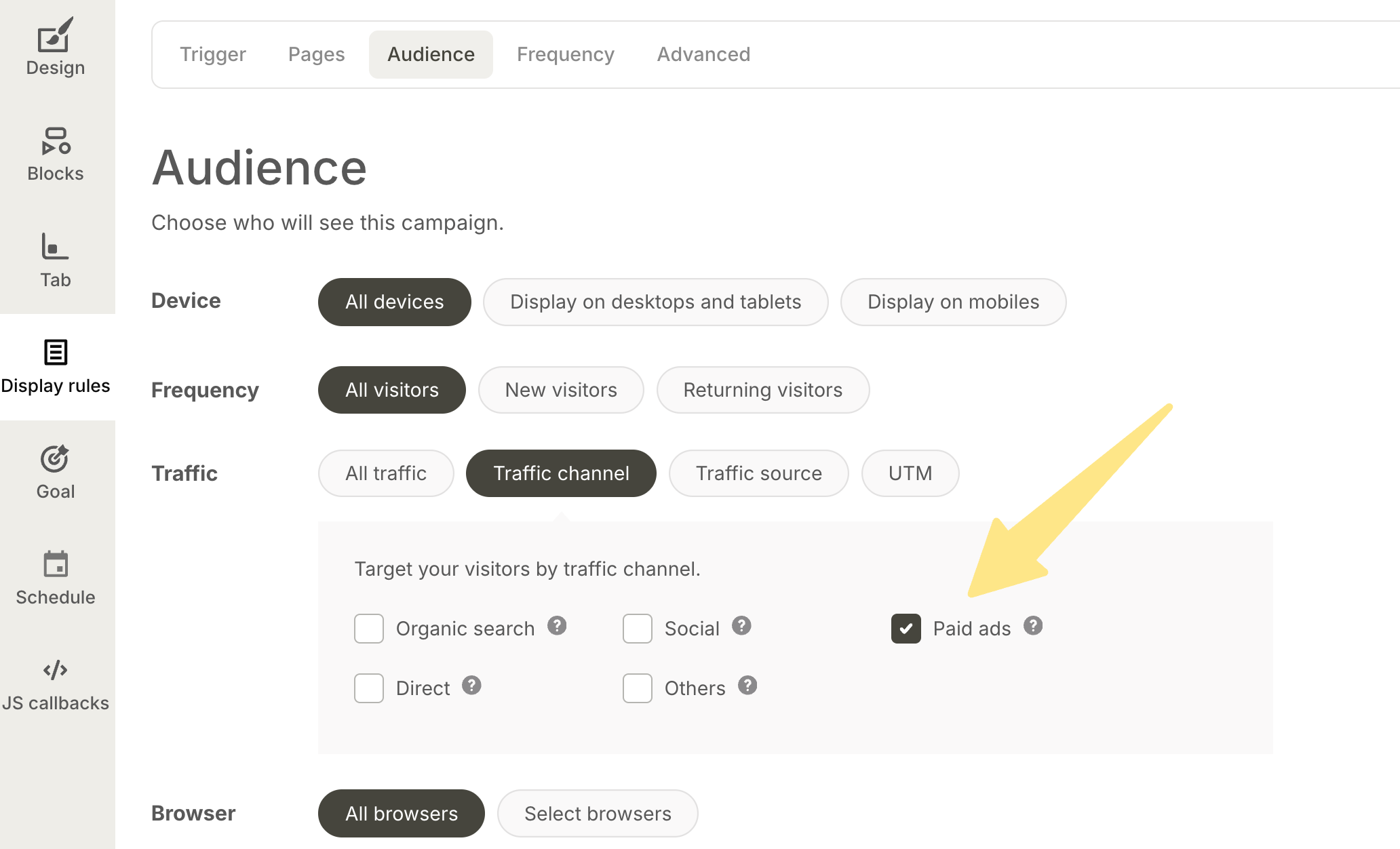
Targeting set to show the popup only to visitors from paid ads
Black Friday popup tip:
Create different offers for different visitor groups. Paid visitors might be first-time customers who'd enjoy a discount. Direct visitors probably know your brand and could get extra perks, since they've likely bought before.
To build these groups, you can target by traffic source and visitor type.
6. Send homepage visitors to your deals
A Black Friday deals popup on the homepage sends shoppers straight to the part of the sale they care about. They skip the search through the menu:
Shop the sale by room
An example homepage popup linking to the sale by room
How to set up a deals page popup:
Trigger: Homepage visitors after 3 seconds, once per visitor, from the morning the sale opens.
Goal: Send shoppers to the part of the sale they care about.
Popup content:
Headline: Announce that the sale is live
Visual: Add three or four tiles by room or category, each with its discount range
CTA: Link each tile to its sale page
Secondary: Add a link to all Black Friday deals for everyone else
For shoppers who've never visited before, you can also convert first-time visitors with a welcome popup that leads with your sale.
7. Show personalized offers
A personalized Black Friday popup changes the offer based on what each shopper has browsed or bought. Someone who viewed three sofas sees sofa deals, and a returning customer sees an offer for their next order.
Here's how that can look for a shopper who has been browsing sofas and lighting:
Free delivery on orders over $500 · 100-night returns
Still deciding?
Black Friday prices on the pieces you looked at.
An example popup showing Black Friday prices on the pieces a shopper viewed
Pierre Hardy, a shoe and accessories brand, does the same with AI product recommendations. Each visitor sees sale pieces picked from the styles they viewed:
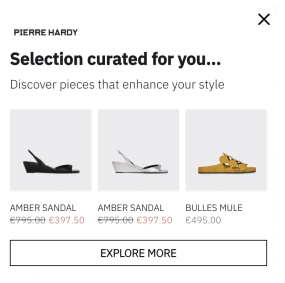
Pierre Hardy's popup with sale pieces picked from the visitor's browsing
How to set up a personalized offer popup:
Trigger: Returning visitors who viewed at least two products on an earlier visit, once per visit.
Goal: Show each shopper the Black Friday deals closest to what they browsed.
Popup content:
Headline: Keep it short and refer to the products the shopper looked at
Products: Show the items they viewed with regular and sale prices
CTA: Link to the full sale
Optional: Add the shopper's first name when you have it
Customers who ordered in the last 30 days can get a separate version, with an offer for their next order.
8. Upsell and cross-sell products
A Black Friday upsell popup suggests products that go with what a shopper has added to the cart, often with a small bundle discount. Here's how that can look right after a sofa goes into the cart:
Free delivery on orders over $500 · 100-night returns
Complete the look
25% off these when you add them today.
An example popup suggesting a cushion and a throw at 25% off after a sofa is added to the cart
How to set up an upsell popup:
Trigger: On product pages, right after a shopper adds an item to the cart.
Goal: Raise the order value of shoppers who've already decided to buy.
Popup content:
Confirmation: Confirm the item added, with the product and its price
Headline: Suggest finishing the set or the room
Products: Show two matching items with sale prices and an add button each
CTA: Send shoppers on to the cart
Product pages suit upsell popups better than the homepage, since shoppers there are already looking at something specific.
9. Offer a free item with selected products
:quality(80))
CODAGE Paris's free item offer, shown after a shopper views two serums
This popup from CODAGE Paris, a skincare brand, appears after the shopper views at least two serums, so visitors browsing other products won't see it. That's the targeting that makes the offer feel personal.
How to set up a free item popup:
Trigger: Visitors who view at least two products in a category, for example pages with “serums” in the URL.
Goal: Speed up sales in one category with a useful extra product.
Popup content:
Headline: Name the free item and what shoppers need to buy to get it
Visual: Show a photo of the free item
CTA: Link to the category the offer applies to
Fine print: Add the end date and any stock limit
Replenishable items that customers use often make good free gifts.
10. Reward bigger carts with a mystery gift
A Black Friday mystery gift popup appears once a shopper has something in the cart, with the amount left to spend for a surprise gift:
Free delivery on orders over $500 · 100-night returns
A mystery gift for
orders over $150
A surprise from our home collection, worth up to $60.
One gift per order, while stocks last.
An example popup showing a shopper how far they are from a mystery gift
How to set up a mystery gift popup:
Trigger: Visitors with at least one item in the cart and a cart value below your gift threshold.
Goal: Raise cart values above a set amount.
Popup content:
Headline: Say there's a surprise gift and the cart value that earns it
Visual: Show a gift image and a progress bar with the amount left to spend
CTA: Send shoppers back to browsing
Fine print: Add one gift per order and any stock limit
The same idea works as a mystery discount, where the shopper reveals a surprise code at checkout. Exit-intent versions can reach hesitating visitors too.
11. Collect emails with a Black Friday wheel or quiz
An example spin-to-win side panel with Black Friday prizes
How to set up a Black Friday wheel popup:
Trigger: New visitors after 15 seconds or on exit intent, once per visitor, in the two weeks before Black Friday.
Goal: Collect more emails with a prize that works on the sale.
Popup content:
Headline: Promise a prize that shoppers can use on the sale
Wheel: Add a mix of prizes and a few “next time” slots, with odds set so the most generous prizes stay rare
Form: Ask for the email address only
CTA: Put the spin in the button text, such as “Spin the wheel”
And here's another example of a gamified Black Friday campaign:
:quality(80))
Aime's advent calendar popup, with a new offer behind each box
This advent calendar popup from Aime creates daily engagement by gamifying holiday shopping. The numbered boxes build anticipation, and the email field turns each visit into a new lead.
For Black Friday weekend, you can condense the calendar into four days of rising offers, from Thursday to Cyber Monday.
Quizzes and multi-step forms work in a similar way. Emma Sleep asks what shoppers need for a perfect sleep before its Black Friday signup form. That extra step brought a 50% higher subscription rate than a single-step version:
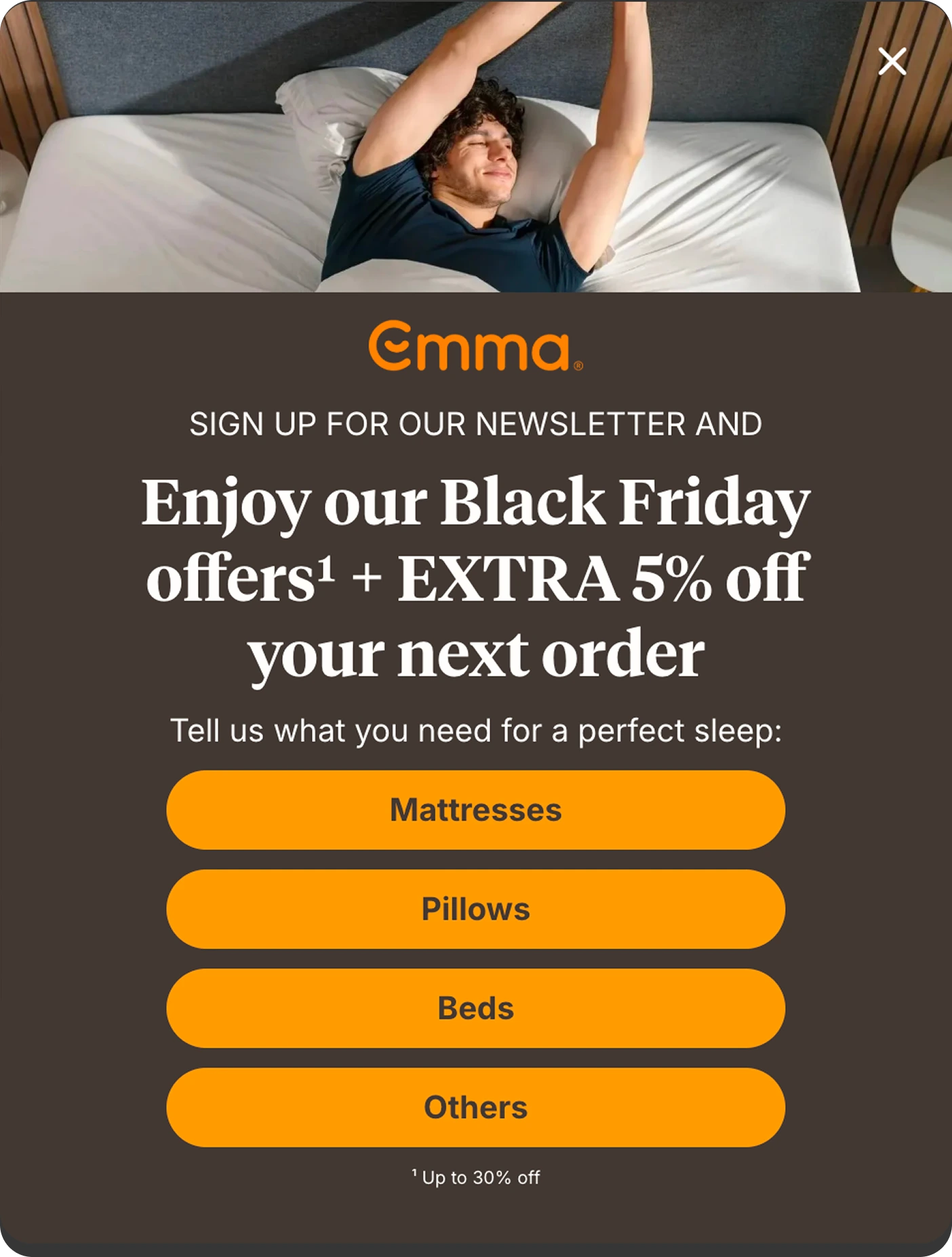
Emma Sleep's Black Friday signup popup asking what the shopper needs first
Nordic Wave, a cold plunge brand, uses a short quiz before the sale. The popup asks visitors what draws them to cold plunging, then offers a free gift:
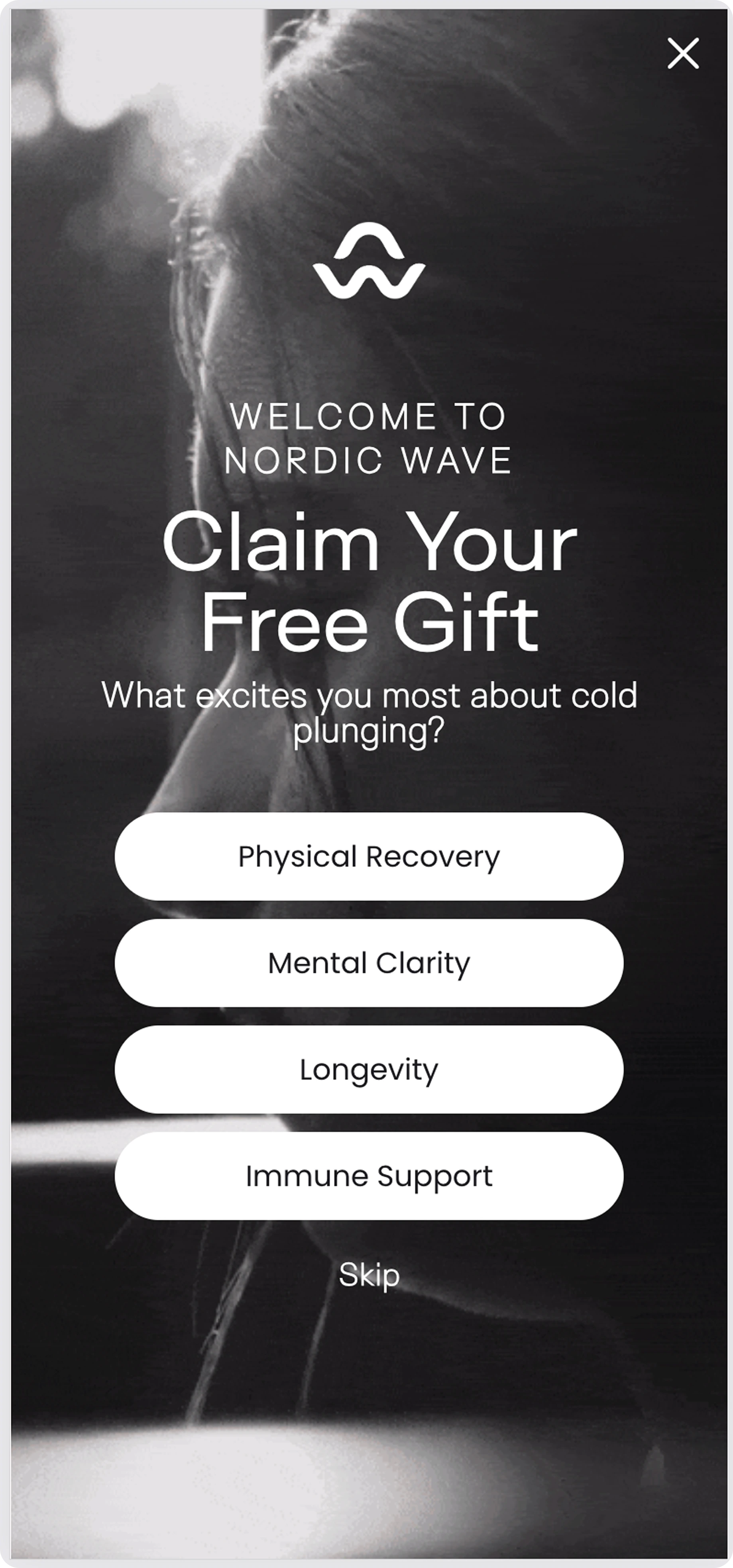
Nordic Wave's quiz popup offering a free gift
For more formats, see these spin-to-win popup examples and gamified popup ideas.
12. Recover abandoned carts with exit-intent and AI popups
Emma Sleep showed this Black Friday cart abandonment popup to visitors about to leave with items in their basket. The popup has no form and no discount, only a deadline, a 200-night trial, free returns and one "Complete my purchase" button:
Emma Sleep's Black Friday exit-intent popup on the cart page
In an A/B test against a control group, the popup helped Emma cut cart abandonment by 5.54%. Average order value rose by 5.5% at the same time.
Nutrimuscle, a sports nutrition brand, uses AI cart recovery to remind shoppers about to leave of the items in their cart:
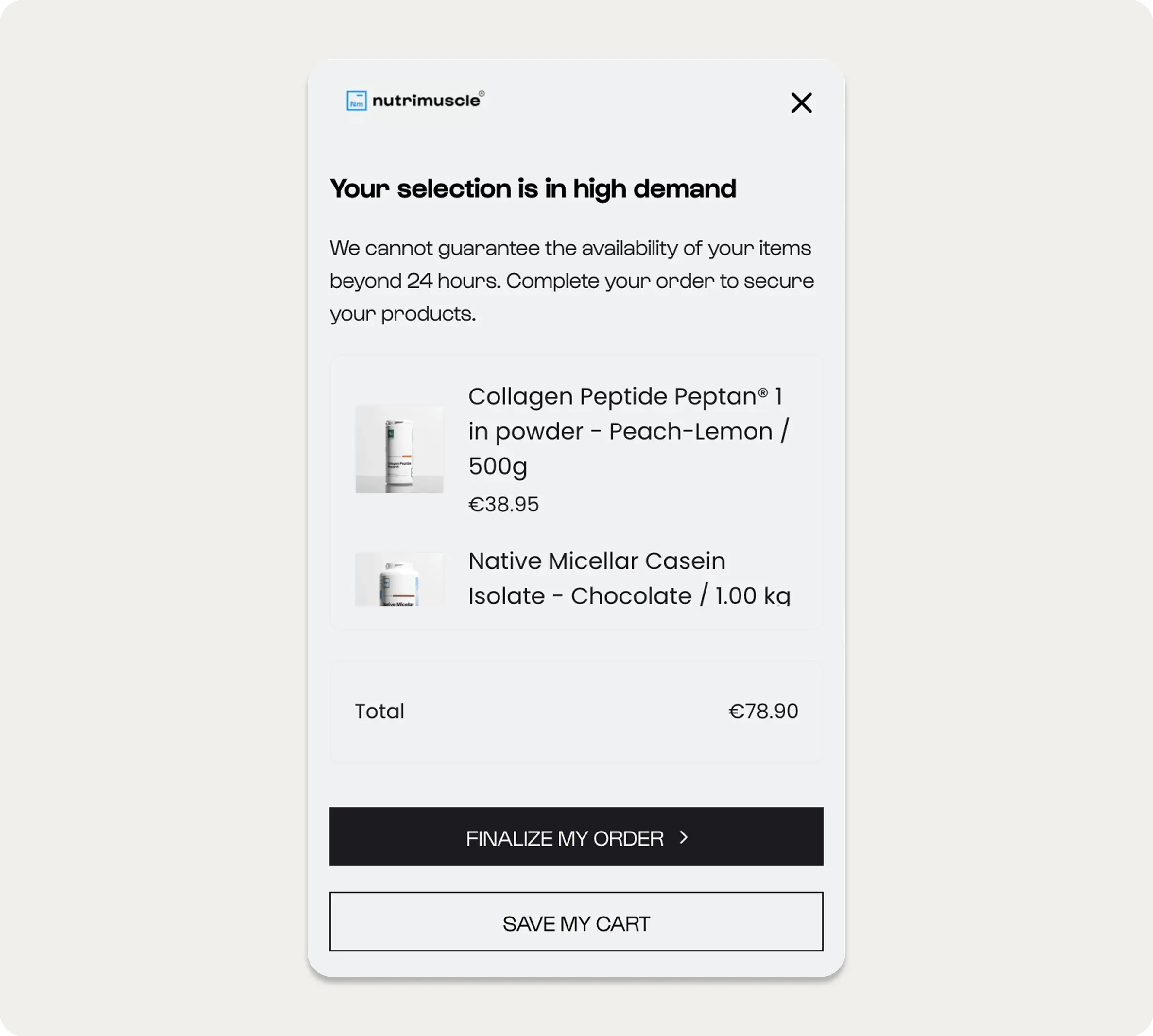
Nutrimuscle's AI cart recovery popup listing the items in the cart
How to set up a cart recovery popup:
Trigger: Exit intent on the cart page for visitors with items in the cart. AI cart recovery can also predict which shoppers are likely to leave. On phones, a quick scroll back up or a set time on the cart page.
Goal: Bring shoppers back to checkout before they leave.
Popup content:
Headline: Give a short deadline for the price in the cart
Products: With AI cart recovery, list the items still in the cart with their prices
Reassurance: Add your strongest answer to doubts, such as free returns, delivery dates or a trial period
Countdown: Put two hours on the clock to show how long the cart price holds
CTA: Use one button that goes back to checkout
A control group that sees no popup shows how many orders the popup actually adds.
13. Promote last-minute deals with Cyber Monday popups
:quality(80))
A last-chance popup that extends the sale for email subscribers
On Cyber Monday, consider replacing your signup popups with popups that send shoppers straight to the remaining deals. Visitors who subscribed earlier in the week don't need another form, and a one-click code gets them to checkout faster.
Here's a Cyber Monday popup from DB Journey, a travel bag brand. The popup counts down to the 23:59 end of the sale and sends shoppers straight to the discounted items:
:quality(80))
DB Journey's Cyber Monday popup with a countdown to the end of the sale
How to set up a last-chance popup:
Trigger: Cyber Monday visitors who viewed your sale pages earlier in the week without ordering. Exclude anyone who reached the order confirmation page.
Goal: Close the remaining sales before the deals end.
Popup content:
Headline: Make clear it's the last day of the sale
Text: Say which deals are still live and when the sale ends
Code: Use a code that applies in one click
CTA: Link to the remaining deals
You can pair this popup with a countdown bar. Bardot ran one Black Friday countdown bar across its sites from a single campaign, building urgency during each visit without interrupting shopping:
:quality(80))
Bardot's countdown bar announcing its Black Friday sale
To show a VIP version only to existing email subscribers, you can use UTM parameters or custom URL parameters:
Add UTM parameters to your email links. For example:
https://yourstore.com/?utm_source=email&utm_medium=campaign&utm_campaign=exclusive_offerTarget those parameters in your popup tool. Set the popup to show only when the UTM source is
email.Narrow the audience if needed. Match the medium and campaign parameters from your email links too.
The popup then appears only to visitors who arrive through those email campaign links.
14. Add more members to your loyalty program
Double points on your
Black Friday order
- 2x points on every order until Cyber Monday
- Early access to future sales
- Free delivery on orders over $300
An example popup inviting shoppers to join a loyalty program with double points on Black Friday
How to set up a loyalty program popup:
Trigger: Visitors who have viewed three or more pages, a sign they're considering a purchase. Exclude existing members, for example by customer tag.
Goal: Turn Black Friday shoppers into program members.
Popup content:
Headline: Give a Black Friday reason to join, such as extra points on sale orders
Perks: List three member benefits, one line each
CTA: Make joining feel free and quick
Secondary: Add a sign-in link for existing members
15. Bring first-time Black Friday buyers back
Black Friday brings in shoppers who've never ordered before. Once Cyber Monday is over, a post-sale popup can welcome them back and show what's new. The same popup can remind them of the last order date for holiday delivery.
New in since
your last order
Order by Dec 15 for holiday delivery.
See what’s newBrowse the gift guideAn example popup for returning customers after Cyber Monday
How to set up a post-sale popup:
Trigger: Returning customers who placed their first order during the sale, from the day after Cyber Monday.
Goal: Win a second order from new customers.
Popup content:
Headline: Welcome shoppers back and point to what's new since their order
Text: Mention new arrivals and your last order date for holiday delivery
CTA: Link to new arrivals
Secondary: Add a link to your gift guide
Switch your sale popups off the day after Cyber Monday, and add a bar with the last order date. For nonprofits, the same day suits a Giving Tuesday appeal.
Black Friday popup FAQ
What is a Black Friday popup?
A Black Friday popup is a website campaign for the Black Friday season, from an early-access signup form to a Cyber Monday countdown. Formats include signup forms, spin-to-win wheels, countdown timers, gift offers and exit-intent messages.
When should you launch Black Friday popups?
Publish early-access signup popups about two weeks before Black Friday, the median launch date on our customers' sites in 2025. Signup rates rose to 12.0% between November 14 and 17 and peaked at 13.6% on Black Friday, against 7.6% in late October.
How many Black Friday popups can you show on one page?
Show one popup at a time on a page, and let any others wait until the first is closed. A sale popup can still run alongside a countdown bar, since the bar sits at the edge of the page.
How should Black Friday popups look on mobile?
Keep them small and quick to close. A bottom sheet or a short centered popup with one field, a large button and a headline of a few words works on most phones. For more layout tips, see these mobile popup best practices.
Do Black Friday popups need a discount?
A discount is one option among several. Early access, a free gift, free shipping or longer returns give shoppers a reason to buy without lowering your price. A discount can go only to the visitors who need one, such as first-time visitors from paid ads.
Will Black Friday popups annoy shoppers?
They can if every page shows a new one. Limit each popup to one or two views per visitor, and keep signup forms off cart and checkout pages. Subscribers can skip signup popups entirely.
How do you know if your Black Friday popups worked?
Compare shoppers who saw the popups with a small group of visitors who saw none. The difference in orders and revenue shows what the popups added. For a sale that lasts a few days, an attribution window of 24 to 48 hours keeps the numbers close to the sale.
What should Cyber Monday popups focus on?
On Cyber Monday, consider pointing your popups at the deals that are still live. You could swap email capture for a last-chance popup with a one-click code. Pair the last-chance popup with a countdown bar that shows when the offer ends.
How do you stop a Black Friday popup when the sale ends?
Set an end date and time zone for each popup, so it stops showing when the offer ends. Check your countdown timers too, so none of them count down to a sale that's already over.
Get started
in minutes
Start converting more visitors today.
Get started in minutes and see results right after.