










How to Get Sales on Shopify: 14 Ways to Start Selling Fast

Read summarized version with
 ChatGPT
 Perplexity
 Gemini
 Claude
 Grok
Key takeaways
What it takes: Shopify sales depend on two things, a store that visitors trust enough to buy from and a steady flow of targeted traffic. Fixing the store first means paid traffic isn't wasted later.
Conversion rate: Ecommerce stores commonly convert between 1% and 4% of visits. Shopify's analytics show whether sessions stop before the cart, at the cart or at checkout, which tells you what to fix first.
Trust and mobile experience: Customer reviews, a clear returns policy and secure payment badges reassure first-time buyers. On phones, pages need to load fast, with readable text and checkout buttons that are easy to tap.
Offers and order value: An introductory discount or a limited-time deal gives new visitors a reason to buy now. Bundles, add-ons after add to cart and free shipping reminders raise the value of each order.
Free traffic: Share the launch with your personal network and take part in niche communities. Short-form product videos and SEO on product pages bring buyers without an ad budget.
Paid ads and creators: Once the store converts, scale with Meta or TikTok ads whose creative shows the problem the product solves. Visitors from ads respond to different messages than search visitors, so show each group its own offer.
Cart recovery: Shoppers with items in the cart are the closest to buying. An onsite message before they leave and abandoned cart emails after they go bring many of them back.
Repeat sales: A welcome popup collects emails from visitors who aren't ready to buy. Welcome and post-purchase emails, plus a loyalty program, turn first-time buyers into repeat customers.
A Shopify store can get visits for weeks and still show zero orders, or sell steadily and then stall. The cause usually sits in one of two places: too few of the right visitors, or a store that loses the ones it already has.
This guide covers both, from getting the first orders to ways to increase sales on Shopify once traffic arrives. Start with the diagnosis, then pick the ways that match your store.
In this guide:
See your segments
Turn more of your Shopify traffic into orders
We review your traffic and show which behavioral segments you have, the campaigns that fit each one, and the revenue they could reach.


of online revenue from campaigns that help shoppers find products and finish their orders
Read the story →To see what established stores do differently:
Successful Shopify stores: well-known stores with their revenue figures.
Shopify success stories: how 10 brands grew, with lessons from each.
Shopify clothing stores: 50 apparel store examples to learn from.
Why your Shopify store isn't getting sales
Sales on a Shopify store depend on two numbers: how many people visit, and what share of them buy. When orders are low, one of those numbers is the cause, and each one needs different fixes.
Common reasons a Shopify store isn't getting sales:
Too little traffic. A new store has no search rankings, no audience and no ad history, so visits start close to zero.
Low trust. Missing reviews, unclear returns and unfamiliar payment options make first-time visitors hesitate at checkout.
Thin product pages. Stock photos and spec-only descriptions leave shoppers unsure whether the product fits their need.
No reason to buy now. Without a launch offer, a free shipping threshold or a seasonal promotion, visitors leave planning to return later.
No way to bring visitors back. Without an email list, a visitor who leaves the store has no reminder to come back.
One message for every visitor. A new visitor and a returning customer see the same products, which AI product recommendations can personalize.
Friction at checkout. Surprise shipping costs, extra steps and forced account creation lead to cart abandonment from ready buyers.
Find where visitors drop off in Shopify analytics
Shopify's analytics show how many sessions added to cart, reached checkout and completed checkout. Comparing those steps tells you which of the 17 ways below to try first.
Ecommerce stores commonly convert between 1% and 4% of visits. If your rate sits well below that range, start with the store before buying more traffic.
How to read the drop-off:
Where sessions stop
What it often points to
Ways to try first
Few sessions overall
The store isn't visible to buyers yet
Ways 5 to 10
Sessions, but few add to cart
Product pages, trust or the offer
Ways 1 to 3, 11 and 12
Add to cart, but few reach checkout
Shipping costs, hesitation or price
Ways 13 and 15
Checkout started, few completed
Payment options, surprise costs or trust
Ways 2 and 15
First orders, few repeat orders
No contact with buyers after the sale
Ways 16 and 17
If your product pages already get traffic, these pages cover what to change next:
Increase Shopify conversion rate: 20+ changes to product pages, cart and checkout.
Shopify CRO strategies: examples and tools for testing what works on your store.
How to get sales on Shopify: 17 ways
The ways below are grouped by what they fix: the store, free traffic, paid traffic, conversion and repeat sales. Every way except paid ads can help you get more sales on Shopify without an ad budget.
Fix the store first:
Get free traffic:
Buy traffic:
Convert more of the traffic you get:
Bring buyers back:
1. Optimize your product pages
Shoppers can't touch or try anything on a Shopify store, so product images and descriptions carry the decision to buy. Both deserve more care than a theme's default layout gives them.
Start with descriptions, and make them benefit-focused and easy to read. This Allbirds description, from a footwear retailer, passes the test:

Why the Allbirds description works:
Short paragraphs make the copy easy to scan on a phone screen.
"Walking" and "everyday wear" help shoppers picture when they'd use the shoe.
Sensory words like "breathable" and "silky-smooth" describe how the product feels.
You can apply the same ecommerce copywriting formula to almost any product. Next come the visuals, where Taylor Stitch mixes standard shots, close-ups of details and photos of the product being worn:

Check every product page on a phone as well, since a slow or cramped mobile page loses buyers before they read anything. A clean, fast theme and compressed images keep load times short.
2. Add trust signals
A trust signal is a badge, logo or policy that tells shoppers their payment and purchase are safe. A new store needs them more than a known brand, because visitors have no history with it.
Trust signals to add first:
Secure checkout and accepted payment badges near the add-to-cart button.
A returns or money-back policy that's visible from the product page.
Shipping costs and delivery times stated before checkout.
Contact details and an About page with real people behind the brand.
A "secure payment" badge, for example, tells customers their card details are protected during payment:

Badges take minutes to add. Apps like Free Trust Badge add payment badges to product pages, and the Shopify App Store lists many alternatives.
3. Collect and show customer reviews
Reviews answer the question every first-time visitor has: did people like what they bought? Starting with zero reviews is hard, so ask every early customer for one.
Holo Taco requests reviews by email after a purchase:

The brand then displays those reviews on its product pages:

4. Add a live chat
Shoppers often have one question left before they buy, about sizing, delivery dates or materials. A live chat answers that question while they're still on the product page.
Once installed, the chat adds a button to your store that opens a chat window. The PRESS store shows how it looks:

Shopify Inbox is Shopify's own free chat app. Whichever one you pick, choose an app with a mobile version, so you can answer customers when you're away from your desk.
5. Announce the launch to your network
Your personal network is the one audience that already trusts you on launch day. Friends, family and colleagues buy first, and their shares reach people who would never find the store on their own.
When Jackie and Evan Streusand started their Shopify store, Highway Robe, they had no marketing budget. They announced the launch on social media and asked people to spread the word, with photos from a guerrilla-style shoot around their neighborhood:

The couple later said the posts brought their first sales.
What to include in a launch post:
The name of the business and what it sells.
A link to the Shopify store or a featured collection.
A first-order offer, such as 10% or $10 off.
A request to share the post with people who'd like the products.
Pin the post to the top of your profiles, so anyone who visits them during launch week sees the store first.
6. Post short-form product videos
TikTok, Instagram Reels and YouTube Shorts show videos to people who aren't following you yet. That reach makes short-form video one of the few channels where a new store can find buyers without an ad budget.
Video formats that show products well:
Demos of the problem the product solves, filmed in real use.
Behind-the-scenes clips of making, shipping or sourcing products.
Unboxing and first-use reactions from customers.
Side-by-side comparisons with what buyers use today.
Shopify's TikTok and Facebook & Instagram sales channel apps let you tag products in posts, so viewers can open the product page in one tap. Post consistently for a few weeks before judging a format, since early videos reach small audiences.
A clip doesn't need to be long to sell. This four-second Allbirds video tests the shoe in the rain, which answers a question buyers have before ordering:

7. Get found on Google with SEO and blog content
Search traffic keeps arriving after you stop working on a page, which makes SEO a free way to get customers on Shopify. Start with product and collection pages, since they're the pages people buy from.
SEO basics for a Shopify store:
Use the words buyers search for in product titles, collection names and meta descriptions.
Write a unique description for each product instead of the supplier's copy.
Add alt text to product images so they can appear in image search.
Submit the sitemap Shopify generates to Google Search Console.
A blog then brings in people who are still researching. Shopify has a built-in blog, and Nutriseed, a healthy food store, uses it for recipes, cooking tips and the health benefits of its products:

Blog content ideas for a Shopify store:
How-to guides, such as "How to choose a mountain bike."
Gift guides for occasions, such as "Eco-friendly gift ideas for Christmas."
Comparisons and reviews, such as "10 top-rated sneakers to try this year."
You can outsource the writing, but write a few posts yourself first. Nobody knows your products and your customers' questions better than you do.
8. Get bloggers and creators to feature your products
Bloggers and small creators look for products to review, and their audiences trust their picks. Many accept free products in exchange for an honest review, without the fees larger influencers charge.
Soxfords, a sock brand that Shopify featured as a success story, got early sales this way. Here's what the founder said about it:

How to get coverage from bloggers and creators:
Find them. Search your product category plus "review," such as "mountain bike reviews," or browse creators who post about your niche.
Get contact details. Authors usually list an email or social profile on their articles and channel pages.
Send a short pitch. Say why their audience would care about the product and offer to send one for free.
For creators who want a commission, Shopify Collabs gives each one a tracked link and pays them a share of every sale they bring.
9. Learn from other Shopify store owners
Thousands of store owners, including some in your niche, have struggled to get their first Shopify sales. Many share what worked, and some will review your store if you ask.
Communities worth joining:
r/shopify for store reviews, app advice and launch questions.
r/ecommerce for marketing and operations across platforms.
r/Entrepreneur for founder stories and early growth tactics.
The Shopify Community forums for platform questions and app issues.

10. Run paid ads
Meta, TikTok and Google ads are the fastest way to send visitors to a new store, often within a day of launching a campaign. You pay for every visit, so ads work best once product pages and checkout are tested.
Why ads help a new store:
They reach large audiences who haven't heard of your brand yet.
They target people by interests, behavior and location.
They show quickly which products and messages get clicks.
Start on one platform with a small daily budget and video or carousel ads that show the problem the product solves. Then move spend to the products and messages that sell.
The Ridge lists its bonuses and social proof right in the ad:

Without reviews or a lifetime guarantee yet, lead with the product's main benefit and add perks like free shipping. Consider linking ads to a collection page, as The Ridge does, so visitors see several options:

Visitors from ads respond to different messages than visitors from search. Pierre Hardy, a luxury footwear brand, shows paid visitors an exclusive interactive popup and keeps a quieter approach for organic visitors.
Where to start with paid ads:
Google Ads for shoppers already searching for your product.
Meta ads for Facebook and Instagram audiences.
TikTok ads for products that show well in short video.
11. Show personalized popups based on store data
Popups work from the first visitors a store gets, whether they come from launch posts, communities or ads. The ones that sell match the offer to the page and the person, and generic popups shown to everyone convert far less often.
On sites using Wisepops, popups targeted to specific pages converted 5.53% of viewers, against 2.40% for popups shown sitewide. The popup conversion benchmarks break this down by trigger and format.
Your Shopify store already holds the data that makes a popup personal:
Cart data: the cart total, the items in it and any discount code already applied.
Product data: the price, tags and stock level of the product being viewed.
Customer data: order count, total spent, customer tags and the date of the last order.
With that data, a popup can show the exact amount left to free shipping, or a real "only 4 left" count from inventory. The same popup can skip shoppers who already applied a code, or offer a win-back reward to VIP customers who haven't ordered in a month.
This guide on how to personalize popups with Shopify data lists every property with ready-made targeting recipes.
These campaigns are popular and effective, each matched to a moment in the visit:
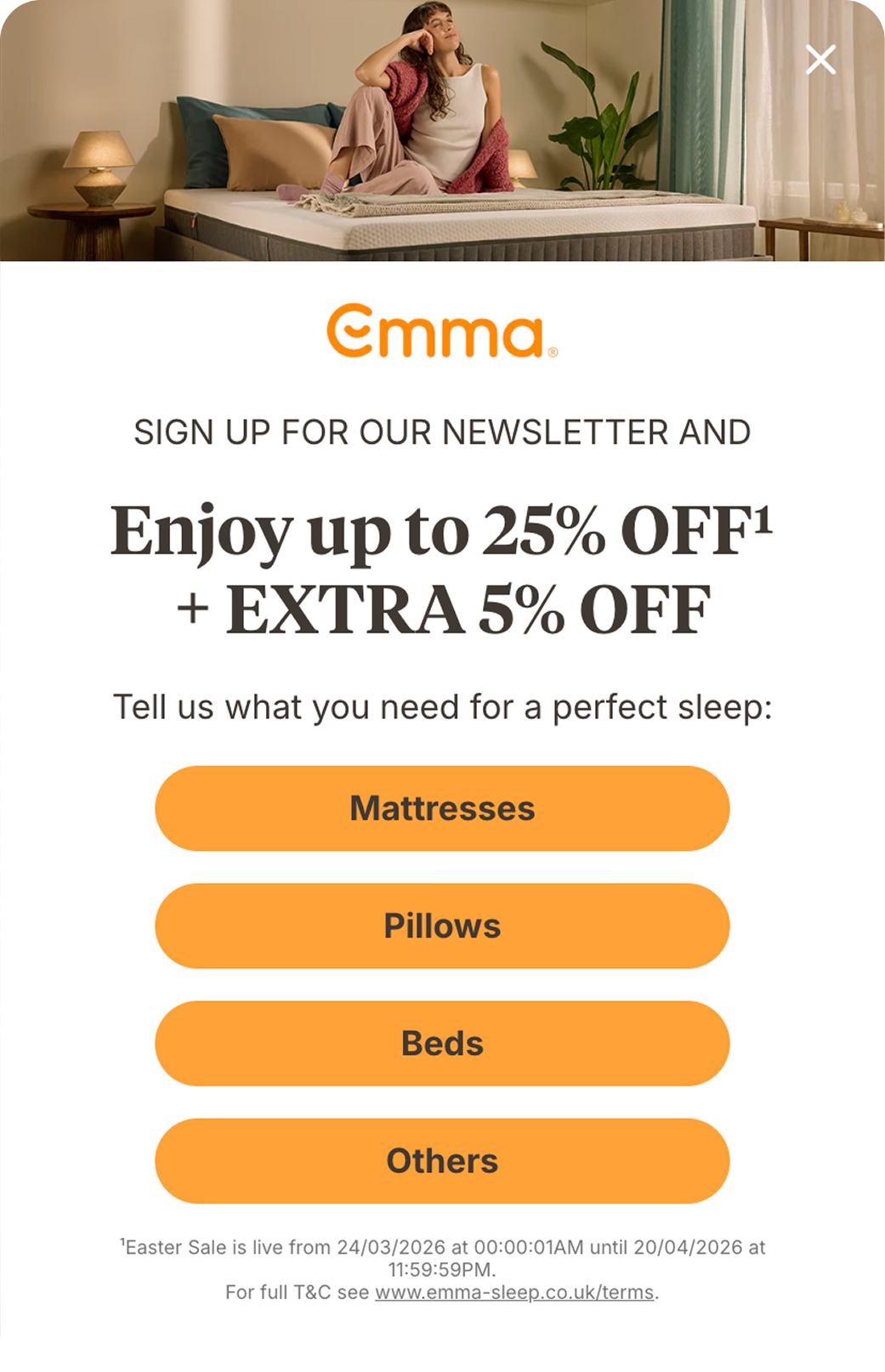
Branching welcome popup
One question about what the visitor is shopping for comes first, then the email field and an offer that fits the answer.
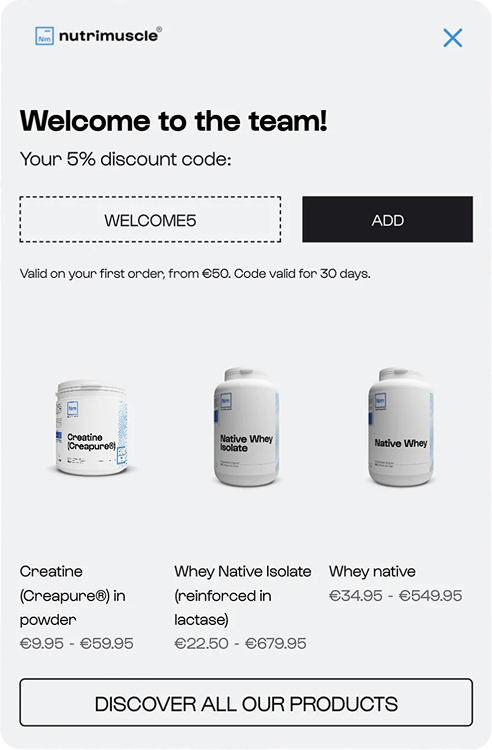
Product recommendations
Best sellers for new visitors and recently viewed products for returning ones, shown next to the welcome code.
Brand
✓ Haven sofa added to your cart
Complete the set


Upsell after add to cart
When a product goes into the cart, the campaign suggests the pieces that complete the set, each with its own add to cart button.
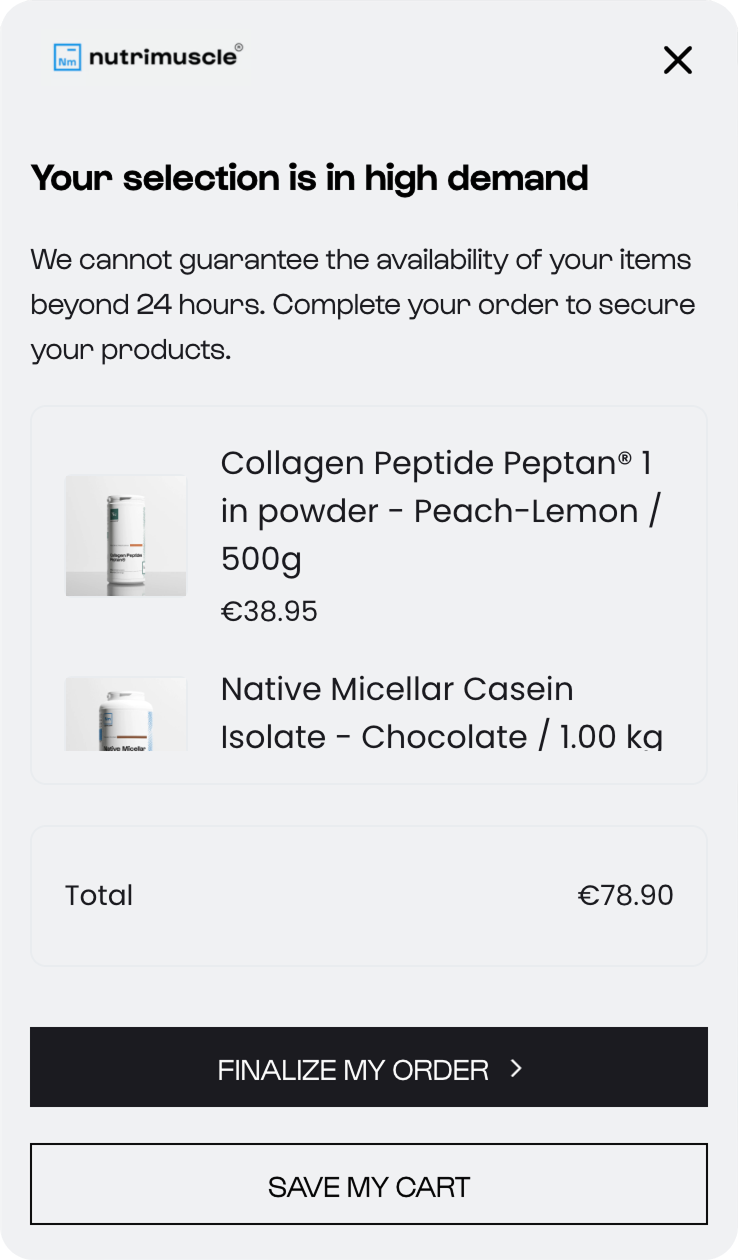
AI cart recovery
Shown when a visitor with items in the cart is about to leave, with those items and an offer to finish the order.
The branching welcome popup asks a question before the email field. In our study of 1.8M sessions, that micro-commitment step doubled signups in the best tests without raising bounce. At Emma Sleep, it increased the email subscription rate by 50% against a single-step popup.
Timing matters as much as the offer. In the same study, a 20 to 50 second delay raised email capture by 20% to 43% in the best tests. Popups shown in under five seconds raised bounce up to five times.
12. Recommend products with AI
Product recommendation tools use browsing activity and sales data to suggest products each visitor is likely to buy. Shopify themes include basic recommendation blocks, though they show the same products to every visitor.
Recommendations sell more when the algorithm matches the visitor:
New visitors: best sellers and trending products, since there's no browsing history yet.
Returning visitors: products they viewed in an earlier session, still one click away.
Shoppers with a cart: products frequently bought with the items in the cart.
Aime, a skincare and supplements brand, shows visitors the products they viewed earlier and its best sellers:

Besides popups, recommendations can sit inside your pages as embedded sections, or in an onsite feed. This page explains how to add recommendations on Shopify with and without apps.
13. Offer bundles and upsells
A shopper who has already chosen one product is the easiest person to sell a second one to. Bundles and add-ons boost Shopify sales by raising the value of orders that were going to happen anyway.
Ways to suggest a second product:
"Frequently bought together" products on the product page or in the cart.
A bundle discount for related items, such as a sofa and its cushions.
A message showing the exact amount left to free shipping, based on the cart total.
A refill or add-on offer for customers who bought a product before.
Pierre Hardy suggests products frequently bought together with the items in a visitor's cart:

14. Keep offers visible in an onsite feed
An onsite feed is a bell icon on your store that opens a list of messages, similar to a social media feed. Visitors see unread messages and open them when they choose, so the store can promote offers without interrupting a visit.
What Shopify stores promote in an onsite feed:
Product launches, with a one-click link to the new product.
Best sellers and trending items for visitors who are browsing.
Flash sales and seasonal campaigns with a deadline.
Recently viewed products for returning visitors.
Pierre Hardy shows best sellers to new visitors in its feed:

Sud Express, a fashion brand, shows each returning visitor the products they viewed before:

At émoi émoi, over 11% of visitors who clicked these recently viewed recommendations went on to buy:

15. Recover abandoned carts
Visitors with items in their cart have already picked a product, so they're the closest to buying of anyone on the store. Two channels bring them back: messages shown before they leave, and emails sent after.
4murs, a wallpaper and home décor retailer, gets most of its traffic from search and runs no paid retargeting. In one test, its AI cart recovery popup reached a 24.5% click-through rate, against zero in the control group:

A cart reminder works without a discount, too. Emma Sleep's exit popup on the cart page shows its trial period, free returns and reviews, with no form and no code. Against a control group, the popup cut cart abandonment by 5.54%:

Pair onsite reminders with an abandoned cart email sequence, so visitors who leave without seeing a popup still get a reminder. Our cart popups study compares exit-intent and AI triggers, with recovered order values.
16. Build an email marketing program
Email turns one visit into several chances to sell, at almost no cost per message. An email program has three parts:
Collect emails from visitors with popups, bars and signup forms.
Connect an email marketing app, such as Klaviyo or Omnisend, to your Shopify store.
Set up automated emails first, then send regular campaigns to subscribers.
If you offer a signup discount, consider showing the code right in the popup. In our popup personalization study, revealing the code instantly led to more codes applied than sending it by email.
Emails to set up first:
Welcome emails. Introduce the brand, its mission and best products, and deliver the welcome discount.
Abandoned cart emails. Remind shoppers about products they left in the cart, a few hours after they leave.
Promotional emails. Announce new arrivals, flash sales and limited-time offers.
17. Start a loyalty program
A loyalty program gives customers a reason to buy their second and third order from you instead of a competitor. Points, perks and early access reward repeat purchases without a discount on every order.
Chubbies Rewards, from the shorts brand Chubbies, gives members $20 in bonuses for signing up:

A loyalty app automates points and rewards for you. Smile.io and Yotpo both offer free features, and these loyalty program examples show how leading brands structure theirs.
Frequently asked questions about Shopify sales
Why is my Shopify store getting visitors but no sales?
Visits without orders usually point to the store itself: product pages, trust, shipping costs or checkout. Shopify's analytics show whether sessions stop before the cart, at the cart or at checkout. Untargeted ad traffic can also browse without any intent to buy.
How do I get my first sale on Shopify?
First sales usually come from people who already know you. Test your checkout with a real order, then announce the launch to your network with a first-order code. Posts in niche communities and free products for small creators can bring the next orders.
How can I get sales on Shopify without ads?
Free channels include your personal network, short-form video, SEO and blog content, creators who review products, and Shopify communities. Popups, product recommendations and cart recovery also add sales from the organic visitors you already have.
How much does Shopify take from a $10 sale?
On the Basic plan with Shopify Payments, Shopify lists a US online card rate of 2.9% plus 30 cents, or $0.59 on a $10 sale. Stores that use a third-party payment provider pay an extra 2% Shopify fee on Basic. Rates vary by plan and country.
Do these ways work for Shopify dropshipping stores?
Yes, with one difference: dropshipping stores often sell products that other stores also list. Original photos and videos, clear delivery times and reviews matter more as a result, since shoppers can compare the same item across sites.
Get started
in minutes
Start converting more visitors today.
Get started in minutes and see results right after.