


:quality(80))


:quality(80))


:quality(80))


:quality(80))


17 best ecommerce tools for 2026 (free and paid)
:quality(80))
:quality(80))
Read summarized version with
 ChatGPT
  Perplexity
  Gemini
  Claude
  Grok
Grok Key takeaways
A full stack covers five jobs: a platform (Shopify, Ecwid, or WooCommerce), marketing and lead capture (Wisepops, Omnisend, Bento), operations (Spocket, Quickbooks), support (Tidio, Gorgias), and reporting (Lucky Orange, Ahrefs, Hotjar).
For a new store, start lean: one platform, one onsite capture tool, one email or SMS tool like Omnisend, and analytics. Add the rest as real needs appear.
Most tools here have a free or low-cost entry plan, so you can build a working stack before committing budget.
Pick tools that integrate with your platform and each other, so data flows without manual exports.
The cheapest way to grow revenue is usually to convert the traffic you already have, not to buy more of it.
This guide picks ecommerce tools by the job they do, from getting the sale to running the store and automating lead capture. We chose tools we have used or seen work in real ecommerce stores, favoring ones with a free or low-cost entry plan and clean integrations. For each one you get what it is best at, what you can use it for, and current pricing.
Jump to a category:
See your segments
Turn more of your traffic into customers
We review your traffic and show which behavioral segments you have, the campaigns that fit each one, and the revenue they could reach.
:quality(80))
Lead generation and marketing
These tools capture leads, keep visitors engaged, and turn the traffic you already have into sales and repeat customers.
1. Wisepops
Wisepops is an AI traffic activation platform. Most stores spend to bring visitors in, then watch the majority leave without buying or even leaving an email. Wisepops turns that existing traffic into leads and revenue, so you get more from the visitors you already pay for instead of buying more of them.
:quality(80))
It starts with a free traffic audit: Wisepops groups your visitors into behavioral segments, shows the campaigns that fit each one, and estimates the revenue each could reach. From there it runs the matched campaigns across the onsite feed, popup builder, embeds, sticky bars, quizzes, and web push, and measures them against a holdout group so you see the actual revenue added, not just clicks.
The audit sorts your traffic into segments like these, each matched to a campaign built for what that visitor is doing:
Acquisition
The first-time browser
Lands from search or an ad, then leaves without buying.
Campaign
Welcome offer, best-sellers
Consideration
The comparison shopper
Compares your price and details against other stores.
Campaign
Reviews, free-shipping offer
Cart recovery
The cart abandoner
Adds items to the cart, then starts to leave.
Campaign
Exit discount, free shipping
Re-engagement
The returning browser
Back for a repeat visit, still deciding.
Campaign
Recently viewed, new drops
Loyalty
The loyal customer
Has bought before, responds to perks and early access.
Campaign
Early access, member perks
Promotions
The deal-seeker
Buys on time-limited and seasonal offers, not full price.
Campaign
Limited-time sale, countdown
Best for
Stores that want more revenue from existing traffic without raising ad spend, and a team to run the program with them.
What stands out
Grow your email and SMS list with multi-step and spin-to-win popups, quizzes, and embeds, each targeted by what a visitor is doing
Recover more carts with AI cart recovery that picks the offer most likely to bring each shopper back, converting over 3x better than an exit-intent popup
Show AI product recommendations that predict what each visitor wants and adapt as they browse, worth up to 10% more revenue
Personalize with your Shopify data: target by purchase history, cart contents, product tags, and customer status, so the right offer reaches the right shopper
Lift average order value with a free-shipping progress bar that updates live as the cart changes, nudging one more item in
Auto-apply a unique Shopify discount code straight to the cart, so the offer redeems in one click
Win back visitors without email using web push for back-in-stock and price-drop alerts
Prove incremental revenue by A/B testing every campaign against a holdout group that sees nothing, so you measure what Wisepops added, not attribution
Run popups, the onsite feed, embeds, bars, and web push from one platform instead of stitching separate apps together
Get a strategist who audits your traffic, builds the campaigns, and reviews performance with you each month
Example campaigns
A few of the campaigns Wisepops runs across the journey, from first visit to cart abandonment:
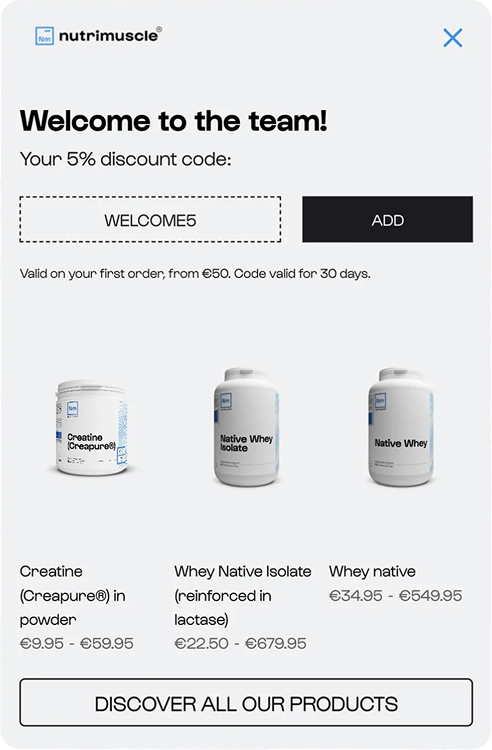
Welcome capture
A first-visit discount popup with best-seller picks that drives the first order.

Quiz match
A short quiz that collects preferences and routes each shopper to the right product.
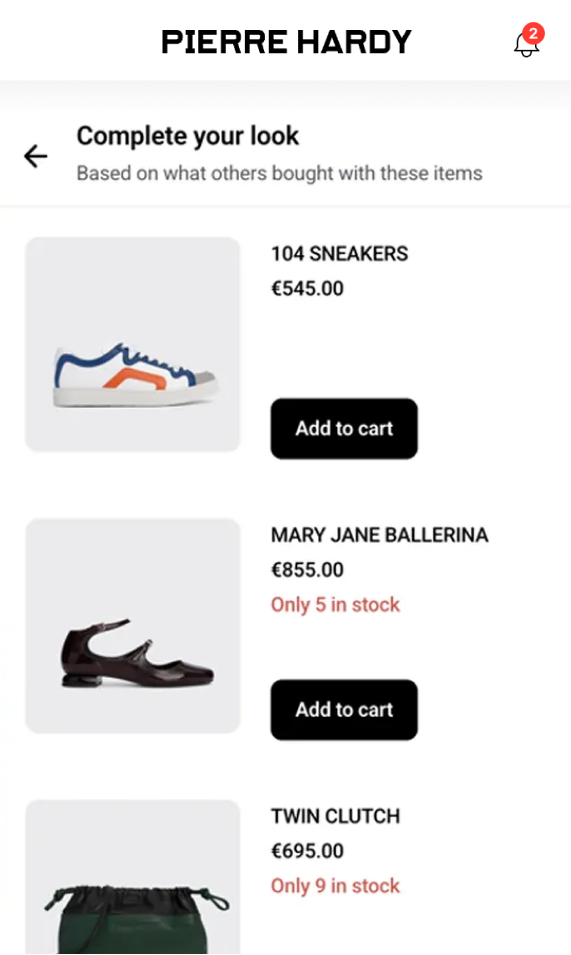
AI product recommendations
An onsite feed of AI picks based on what the visitor added to their cart.
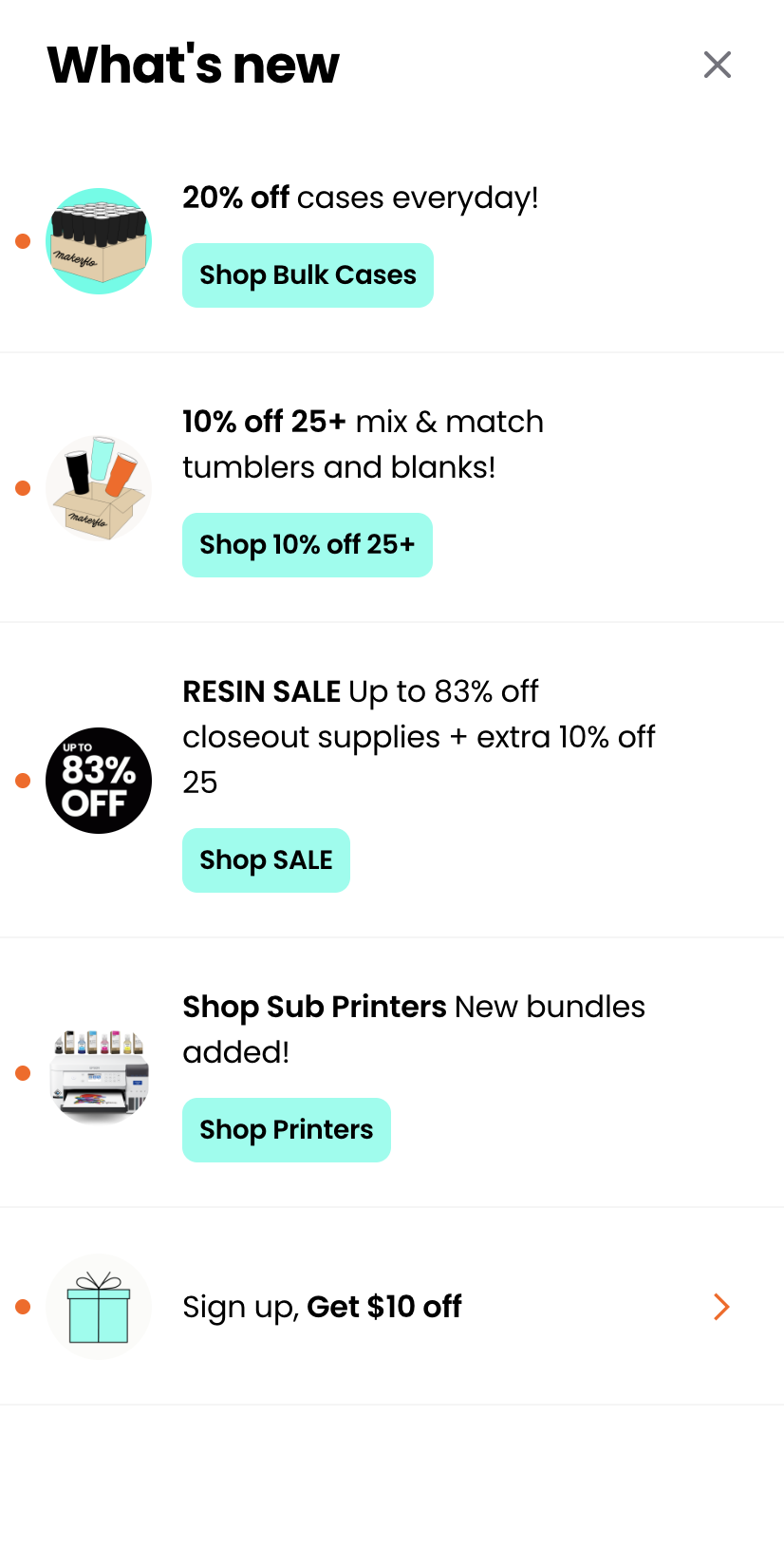
Onsite feed
An onsite feed of the latest offers and sale links, shown to returning visitors.
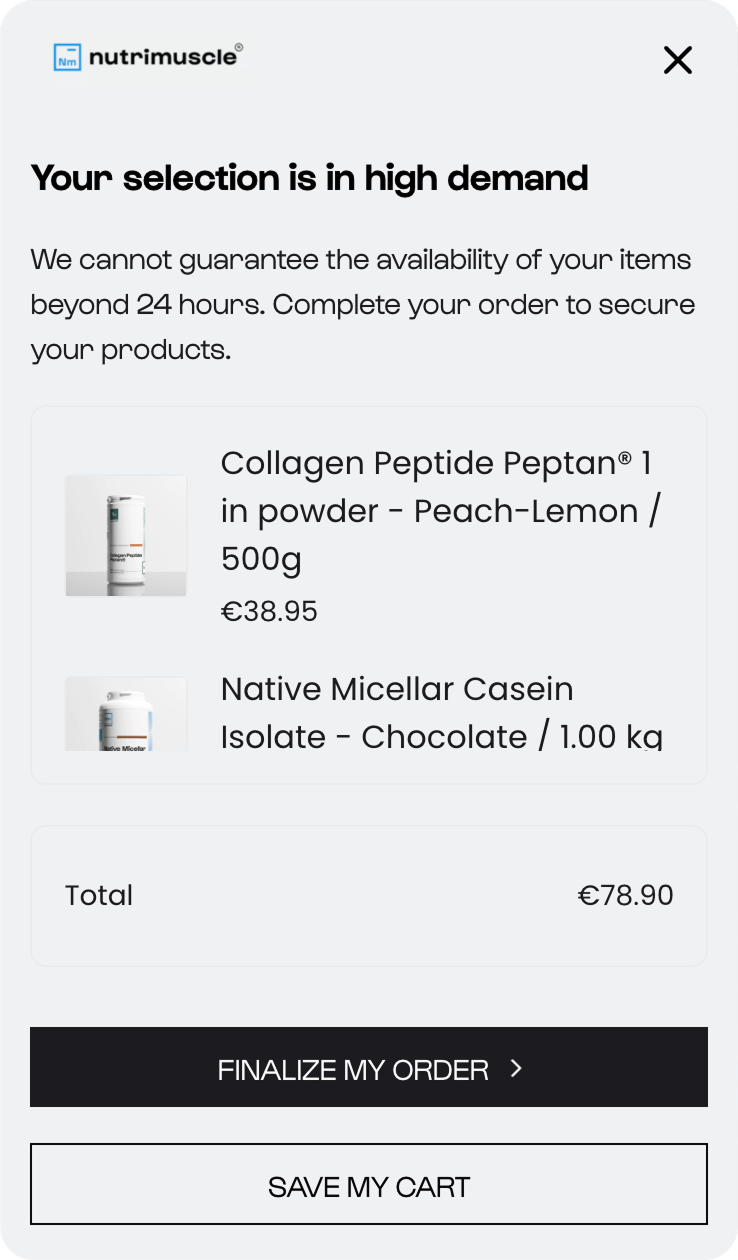
AI cart recovery
Shown as a visitor is about to leave, with the offer most likely to convert.

Back in stock alert
A web push sent the moment a sold-out item is restocked, no email needed.
Pricing
Pricing is personalized to your traffic, and a free trial is available. Book a demo to learn more, or see Wisepops pricing.
2. Omnisend
Omnisend runs your email and SMS from one place, with prebuilt automations for welcome, cart recovery, and post-purchase. Its edge over most email tools is that it also includes capture formats, so you can build the list and send to it without a second app.

Best for: stores that want email and SMS sending with built-in capture, starting free.
What stands out:
Grow and segment your email and SMS list from one place
Recover carts and win repeat sales with prebuilt welcome, cart, and post-purchase flows
Capture signups with built-in popups and spin-to-win, without a second app
Pricing: free for up to 250 contacts, then $16 per month (Standard) and $59 per month (Pro), with SMS billed separately.
3. Bento
Bento is an email, SMS, and automation platform built for technical ecommerce teams. It trades drag-and-drop simplicity for fine-grained control over automations, segmentation, and deliverability, with unlimited marketing sends on paid plans.
:quality(80))
Best for: Shopify stores and developers who want deep control over automations and deliverability.
What stands out:
Build detailed, behavior-triggered automations with granular control
Run email, SMS, chat, and transactional messages from one platform
Send unlimited marketing emails on paid plans, priced per active user
Pricing: no free plan, but a 30-day trial. The marketing platform is $29 per month for up to 5,000 active users, then $0.01 per active user.
4. Stamped
Reviews are the social proof that moves undecided buyers, and getting them is the hard part. Stamped automates the ask after purchase and puts the results to work across your store, in feeds, widgets, and at checkout.
)
Best for: ecommerce stores of any size that want to build review-based social proof.
What stands out:
Collect text, photo, and video reviews automatically after purchase
Show ratings where they lift conversion: product pages and checkout
Bring customers back with review requests that include a discount code
Pricing: free for 50 review requests a month. See Stamped pricing.
Related: AI tools for ecommerce, for using AI across marketing, support, and product content.
5. Smile.io
Smile.io lets you launch points, referral, and VIP programs with no developer. Loyalty pays off by lifting repeat purchases, and Smile handles the signup widget, rewards, and member tracking from one dashboard.
)
Best for: mid-sized and large stores ready to reward repeat buyers.
What stands out:
Increase repeat purchases with points and VIP rewards
Bring in new customers through a referral program
Give members a reason to return with early access and perks
Pricing: free up to 200 monthly orders. See Smile.io pricing.
6. Octane AI
Octane AI builds product-recommendation quizzes that double as a capture tool: a shopper answers a few questions, gets a matched product, and hands over an email on the way. It is a simple, effective form of AI ecommerce personalization for stores with a wide catalog.
)
Best for: stores with a large range where shoppers need help choosing.
What stands out:
Guide shoppers to the right product with a recommendation quiz
Capture emails mid-quiz and segment by the answers
Convert more shoppers on large catalogs where people struggle to choose
Pricing: see Octane AI pricing. Shop Quiz covers 100 quizzes a month free if you are testing the format.
Ecommerce platforms
Your platform hosts the store, manages the catalog, and processes checkout. Here is how the three main options differ before the write-ups.
Platform
Free plan
Starting price
Best for
Shopify
No, 3-day trial
$39 per month
Beginners and apparel, beauty, home
Ecwid by Lightspeed
Yes, up to 5 products
From $5 per month
Adding a store to an existing site
WooCommerce
Yes, open source
Free core, hosting is extra
WordPress users and custom stores
Starting prices are US list pricing on the lowest paid plan, accurate as of July 2026. Check each platform for current plans, since pricing and tiers change.
7. Shopify
Shopify is the default choice for most new stores because it needs no coding and has by far the largest app ecosystem, so almost any feature you need already exists as an app. See the most successful Shopify stores and how much they make.
)
Best for: beginners, and stores in apparel, beauty, or home decor.
What stands out:
Launch a full store fast, with no coding
Add almost any feature you need from the largest app store
Sell across online, social, and in person from one back office
Pricing: $39 per month (Basic), rising to $399 per month (Advanced); about 25% less on annual billing.
Useful Shopify guides: best Shopify apps, Shopify success stories, and how to get sales on Shopify.
8. Ecwid by Lightspeed
Ecwid adds a store to a site you already have, rather than replacing it. You paste a snippet into a WordPress, Wix, or custom page and your products appear, which suits a business with an established site and a small catalog.
)
Best for: small businesses adding a store to an existing site.
What stands out:
Add a store to almost any site with one code snippet
Sell the same catalog across social and marketplaces
Start free while you test the format, up to five products
Pricing: free for up to five products, with paid plans from about $5 per month. See Ecwid pricing.
9. WooCommerce
WooCommerce is a free, open-source store built on WordPress, so it is the most customizable option here. If you want full control over design and features and are comfortable with WordPress, it can run anything from a small shop to an enterprise site.
)
Best for: WordPress users who want a custom, fully-owned store.
What stands out:
Build exactly the store you want on WordPress
Add almost any feature through extensions
Keep full ownership, with no platform lock-in
Pricing: the core plugin is free; real costs come from hosting, a theme, and extensions.
Related: how to make WooCommerce popups for lead generation and sales.
Sales and store management
These tools handle the back office: sourcing products, keeping the books, and blocking fraud.
10. Spocket
Spocket sources dropshipping products from US and EU suppliers, which means faster shipping and more consistent quality than the typical overseas catalog. That tradeoff, speed and quality over rock-bottom cost, is the whole reason to pick it.
)
Best for: dropshipping stores that sell to US or EU customers.
What stands out:
Stock products from US and EU suppliers for faster delivery
Add items to your store and fulfill orders automatically
Order samples to check quality before you list
Pricing: free catalog access, with paid plans from about $25 per month. See Spocket pricing.
Promote products with limited-time offers and sales.
11. Quickbooks
Quickbooks pulls sales, payouts, and expenses into one place so you can see profit clearly and file taxes without a spreadsheet scramble. It is the accounting layer most stores add once orders are steady enough to matter.
)
Best for: stores of any size that want their books in one place.
What stands out:
See profit clearly with sales, payouts, and expenses in one place
Cut manual entry with automatic order sync
Get tax-ready reports without a spreadsheet
Pricing: see Quickbooks pricing for ecommerce.
A time-limited giveaway is a cheap way to grow the list. Get 10 ideas for giveaways.
Ziggy Family used an educational lead magnet to reach 9,300 subscribers in five months.
12. NoFraud
NoFraud screens every order in real time and assigns a fraud score, so risky orders get flagged before they ship and chargebacks stay down. It earns its place once fraud and chargeback fees start eating into margin.
)
Best for: small and mid-sized stores seeing fraud or chargebacks.
What stands out:
Screen every order in real time and flag fraud before it ships
Reduce chargebacks and their fees
Review borderline orders manually
Pricing: see NoFraud pricing.
Customer support
Fast answers keep shoppers buying. These two cover live chat for small stores and a full helpdesk for larger ones.
13. Tidio
Tidio combines live chat with an AI chatbot, so common questions get answered instantly and your team only handles the rest. A live visitor list also lets you reach out to shoppers while they browse.
)
Best for: small and mid-sized stores that want chat plus basic automation.
What stands out:
Answer common questions instantly with an AI chatbot
Reach shoppers while they browse with live chat
Message high-intent visitors first from a live visitor list
Pricing: free for 100 monthly conversations, then $15 per month; the plan for large stores is $39 per month.
New to this? See how to grow an ecommerce store.
14. Gorgias
Gorgias is a helpdesk built for ecommerce that pulls tickets, social messages, and emails into one inbox, with order data alongside each conversation. It can also suggest product recommendations, so support doubles as selling.
)
Best for: mid-sized and large stores handling high ticket volume.
What stands out:
Handle tickets, social messages, and email from one inbox
Reply faster with order context and saved macros
Turn support chats into sales with product recommendations
Pricing: see Gorgias pricing.
Reporting
These tools show what visitors actually do and where they drop off, so you fix friction instead of guessing.
15. Lucky Orange
Lucky Orange shows how visitors move through your store with heatmaps and session recordings, so you can spot the exact steps where people give up. Its free plan is unusually generous for a small store getting started with behavior data.
)
Best for: small and mid-sized stores diagnosing onsite friction.
What stands out:
Watch where visitors get stuck with heatmaps and recordings
Ask visitors what is missing with onsite feedback surveys
Start free with 100 recordings a month
Pricing: free plan available. See Lucky Orange pricing.
16. Ahrefs
Ahrefs is the deep SEO tool for stores that treat organic traffic as a channel, not an afterthought. It finds the keywords worth targeting, audits your site for issues, and shows what competitors rank for.
)
Best for: stores investing in organic search and content.
What stands out:
Find the keywords worth targeting for product pages and content
Fix technical SEO issues with site audits
See what competitors rank for and win those terms
Pricing: see Ahrefs pricing.
Related: the ecommerce SEO guide, with keyword research and on-page tips.
17. Hotjar
Hotjar covers similar ground to Lucky Orange but leans on historical heatmaps, recordings, and funnels, which makes it a good fit for service and SaaS sites analyzing longer journeys. Its funnel view shows exactly where visitors drop off.
)
Best for: SaaS and service businesses studying longer journeys.
What stands out:
See where visitors drop off with funnels and recordings
Collect feedback with onsite surveys
Focus fixes on the steps losing the most shoppers
Pricing: see Hotjar pricing.
Summary
The right stack is the smallest set of tools that covers selling, capturing leads, running operations, supporting customers, and reporting. Start with a platform, one capture tool, one email or SMS tool, and analytics, make sure they integrate, and add the rest only when a real need shows up.
Frequently asked questions
What are the basic tools for an ecommerce store?
Most stores run five basics: a selling platform such as Shopify or WooCommerce, an email and SMS tool such as Omnisend, an onsite capture and activation tool such as Wisepops, a support tool such as Tidio, and analytics such as GA4 or Hotjar. Together they cover selling, capturing leads, and understanding visitors.
What tools does a new store actually need first?
Start with a platform to host the store, one tool to capture and convert onsite traffic, one email or SMS tool to follow up, and analytics to see what is working. That is enough to sell and learn, and you can add sourcing, loyalty, or fraud tools as the store grows.
How many ecommerce tools should I use?
Aim for the smallest set that covers your five jobs, usually four to five tools to start. Overlapping tools create duplicated data and extra cost, so add a new one only when a specific job needs it.
Are there free ecommerce tools?
Yes. WooCommerce core is free, Omnisend is free for up to 250 contacts, Tidio is free for 100 monthly conversations, and Ecwid has a free tier for up to five products. Free plans are a good way to build a working stack before paying.
Get started
in minutes
Start converting more visitors today.
Get started in minutes and see results right after.